Sandbox: Locking the Agent's Hands and Feet on a Floating Island
About harness9
harness9 is a Local-First, lightweight, feature-complete, production-ready general-purpose Go Agent framework.
⭐ A star is the most direct way to support this open-source project. Issues and PRs are welcome.
TL;DR
- Abstract an
Environmentinterface:LocalEnvironment(runs in the local process) andDockerEnvironment(runs in a container) implement the same set of methods, so tool code has no idea — and doesn't need to know — who it's actually talking to - Docker was chosen over "harder-core" options like gVisor or Firecracker because the risks harness9 needs to guard against are adequately covered by namespaces plus capability trimming, and most people already have Docker installed on their machines anyway, so there's no need to set up yet another environment
- The
bashcommand routes throughdocker execto genuinely execute inside the container, while the file tools (read_file/write_file/edit_file) route through a bind mount (mounting the host directory into the container so both sides share the same files) — different mechanisms, but the Agent sees the same workDir either way - A
Container's lifecycle is a five-state flow: creating → running → stopping → terminated/failed. Startup doesn't just ask "ready yet?" once and call it done — it polls repeatedly to confirm the container is genuinely up and running; on stop, regardless of whetherdocker stopsucceeds, it always follows through withdocker rmto remove the container - Container permissions start by stripping everything with
--cap-drop all, then manually adding backDAC_OVERRIDE/SETUID/SETGID— this is the minimal permission set required for package managers likeaptandpipto keep working, not something left open out of convenience - Tag containers with
label=harness9=1and run aReapOrphanssweep on startup specifically to clean up containers left behind when a process was force-killed (kill -9); the whole mechanism is on by default (it's enabled unlessSANDBOX_ENABLEDis explicitly set to false), and turning it off restores the exact behavior from before Sandbox was introduced
What You'll Learn
- Why giving an Agent a bash tool that can run arbitrary commands inherently demands a container safety net
- How the
Environmentinterface lets "running locally" and "running in a container" switch seamlessly at the tool layer - Exactly how the Container state machine transitions, and how the Manager uses locking to guarantee concurrent operations never accidentally kill a running container
- Why the bash tool and file tools take two completely different routes yet still present the Agent with a consistent filesystem
- What problems the three capabilities added back after
--cap-drop alleach solve, and what attackspids-limit,no-new-privileges, and the tmpfs mount policy each defend against
YOLO Is a Double-Edged Sword
harness9's bash tool follows a "YOLO philosophy": it doesn't restrict what commands can be run, leaving that judgment entirely to the LLM. The comment in the tool definition puts it bluntly:
// Giving the Agent full command-line capability is the core of harness9's
// "YOLO philosophy" (Trust-the-LLM): no restriction on which commands can be
// executed, all judgment and decision-making handed entirely to the model.
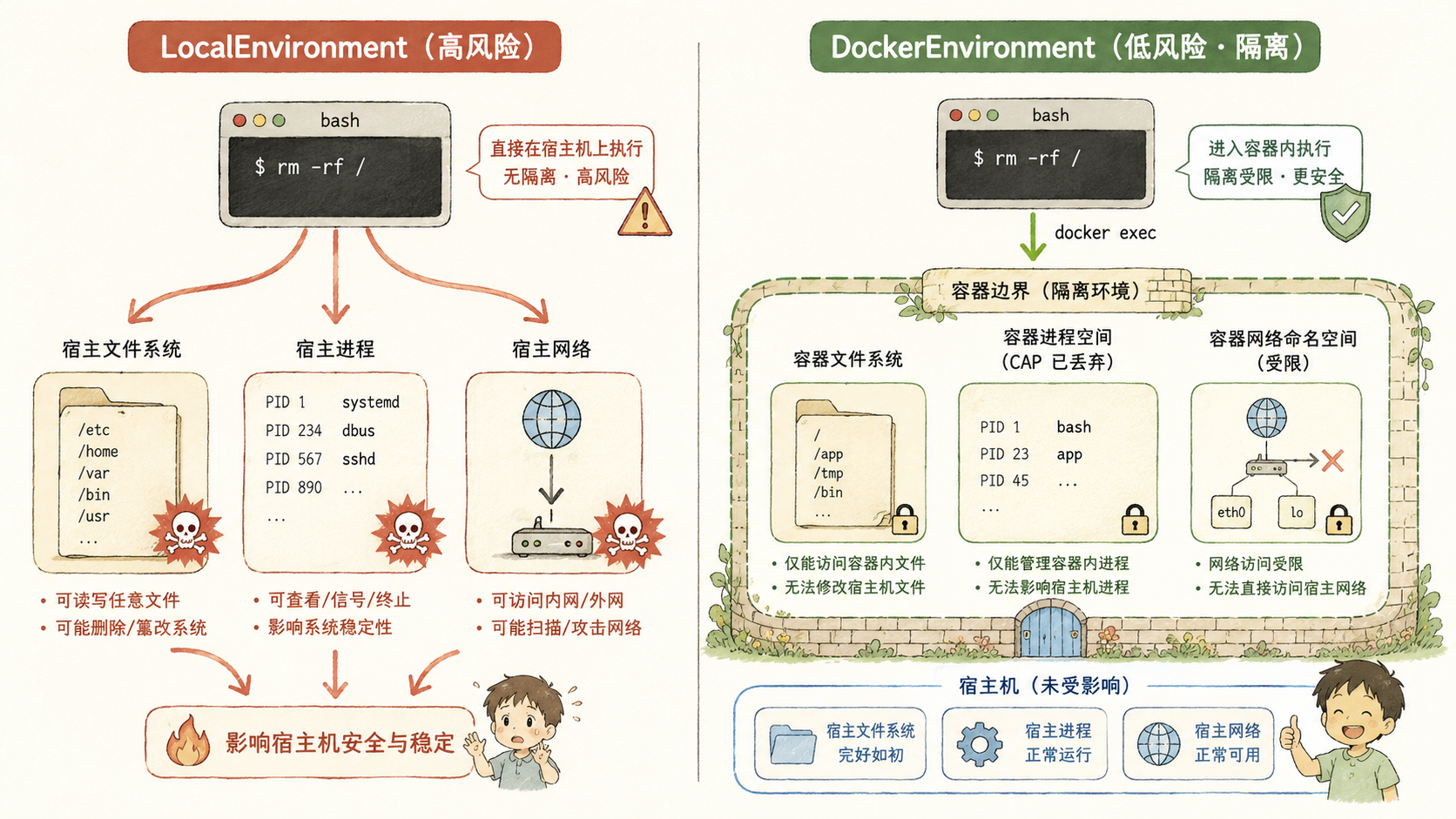
The upside of this is obvious: the Agent can install dependencies, run tests, edit configs, clean up processes — pretty much anything. But the cost is just as obvious — the LLM can make mistakes, misunderstand the scope of a task, or even be lured by prompt injection into executing destructive commands. rm -rf, curl | bash, writing something into ~/.ssh/authorized_keys — if any of these happen inside a LocalEnvironment, it's no different from you accidentally fat-fingering a command in your own terminal.
The project already has hooks.DangerHook intercepting 19 known high-risk command patterns, plus PermissionHook doing allowlist-based approval, but at the end of the day both of these are about "recognizing known bad things ahead of time and blocking them." What they can never fully catch is destructive paths that are novel, obliquely combined, or crafted specifically to dodge keyword matching — real coverage doesn't come from enumerating more dangerous commands, it comes from fundamentally shrinking the blast radius of high-risk operations. That's exactly what container isolation is for: no matter what command the LLM actually generates, the effects of executing it are boxed into an isolated space that the rest of the host machine can't even touch.
Why Choose Docker?
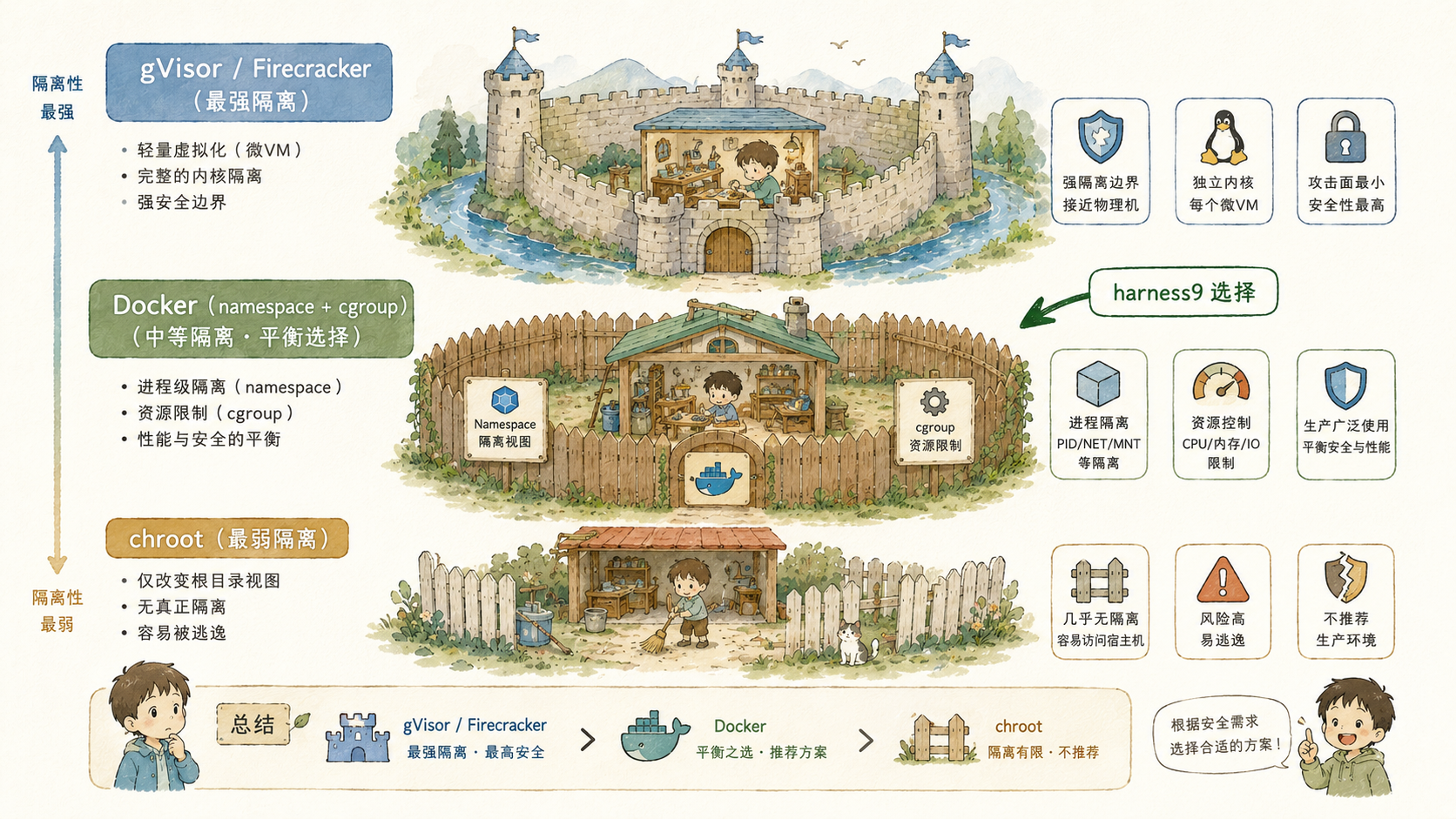
There's no shortage of options in the sandboxing space: gVisor intercepts syscalls in userspace, Firecracker uses microVMs for hardware-level isolation, chroot simply relocates the filesystem root. What harness9 ultimately picked is the seemingly most traditional option — Docker — but that's not about taking the easy way out or being technically conservative. It comes down to weighing three very practical concerns:
The risks that need guarding against just aren't that complicated, so there's no need to reach for heavy machinery. What Agent tool calls really need to be protected against boils down to a handful of categories — "accidentally deleted files," "installed a mess of dependencies that polluted the system," "a runaway script forking processes out of control." Namespaces (giving a process its own isolated view), cgroups (capping resource usage), and capability trimming (stripping unnecessary system privileges) are more than enough to cover these. gVisor intercepting syscalls and Firecracker's hardware virtualization exist to handle far more extreme scenarios — like a cloud provider running code from mutually untrusted tenants on the same physical machine. For running a single local Agent session, that's using a sledgehammer to crack a nut.
How painful the setup is directly determines whether anyone will actually use the feature. gVisor requires installing a separate runsc runtime, Firecracker needs KVM support plus wrangling your own rootfs and kernel image. Docker, on the other hand, is basically standard equipment on any dev machine — as long as the Docker daemon is running locally, flipping on SandboxConfig.Enabled is all it takes. harness9 positions itself as a Local-First, lightweight framework, and it can't let "turning on a security feature" turn into "first go install an entire new virtualization stack."
Only shell out to the CLI, no extra SDK dependency. Open up container.go and you'll see that harness9 doesn't pull in Docker's official Go SDK at all — it directly shells out with exec.Command("docker", args...):
func realCmdRunner(ctx context.Context, args ...string) (string, error) {
	out, err := exec.CommandContext(ctx, "docker", args...).CombinedOutput()
	return strings.TrimSpace(string(out)), err
}
This choice is consistent with the project's overall stance of "keep direct dependencies to a minimum" — the payoff of shelling out to the CLI is that there's no extra library to depend on at compile time, the behavior is identical to typing docker run yourself, and when something goes wrong you can just copy the arguments straight into a terminal to reproduce it. cmdRunner is defined as a function type, so it can be swapped for a fake implementation during tests, letting you verify state-machine transitions without ever having to spin up a real Docker environment.
The Environment Interface Wraps Different Environments
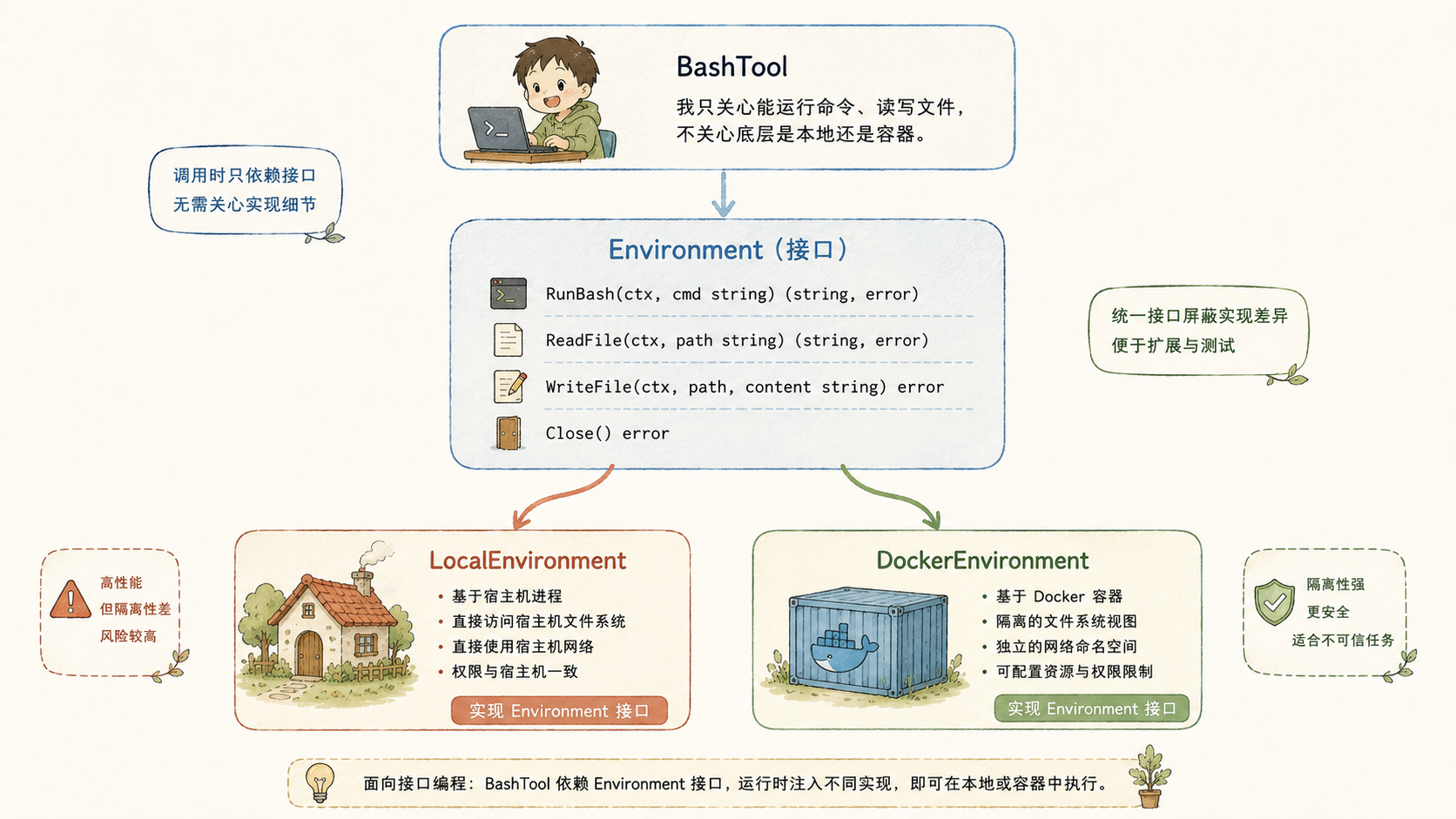
The Agent Engine layer should be completely oblivious to whether a tool is running in the local process or inside a container, and that decoupling is made possible entirely by the Environment interface:
type Environment interface {
	RunBash(ctx context.Context, cmd, workDir string) (string, error)
	ReadFile(ctx context.Context, path string) ([]byte, error)
	WriteFile(ctx context.Context, path string, data []byte) error
	ID() string
	Close(ctx context.Context) error
}
LocalEnvironment implements RunBash with exec.Command("bash", "-c", cmd), while DockerEnvironment implements the exact same method signature using docker exec. The tool layer only ever holds a reference to this interface type — when the BashTool.env field is nil, it takes the local path; when it's non-nil, it routes into the container instead. This is the single most important design decision in the whole Sandbox module: once Sandbox is added, the behavior the tool exposes externally doesn't change at all — only who's actually doing the execution underneath changes.
if t.env != nil {
	return t.runInSandbox(timeoutCtx, input.Command, timeout)
}
return t.runLocal(timeoutCtx, input.Command, timeout)
In other words, when SANDBOX_ENABLED=false, the code path taken is almost identical to how things worked before Sandbox existed — just one extra check, nothing else different. This backward compatibility isn't achieved by wrapping an extra switch statement around everything; it falls naturally out of the interface's own semantics — "pass in a nil value and you get the old behavior back."
The Container State Machine
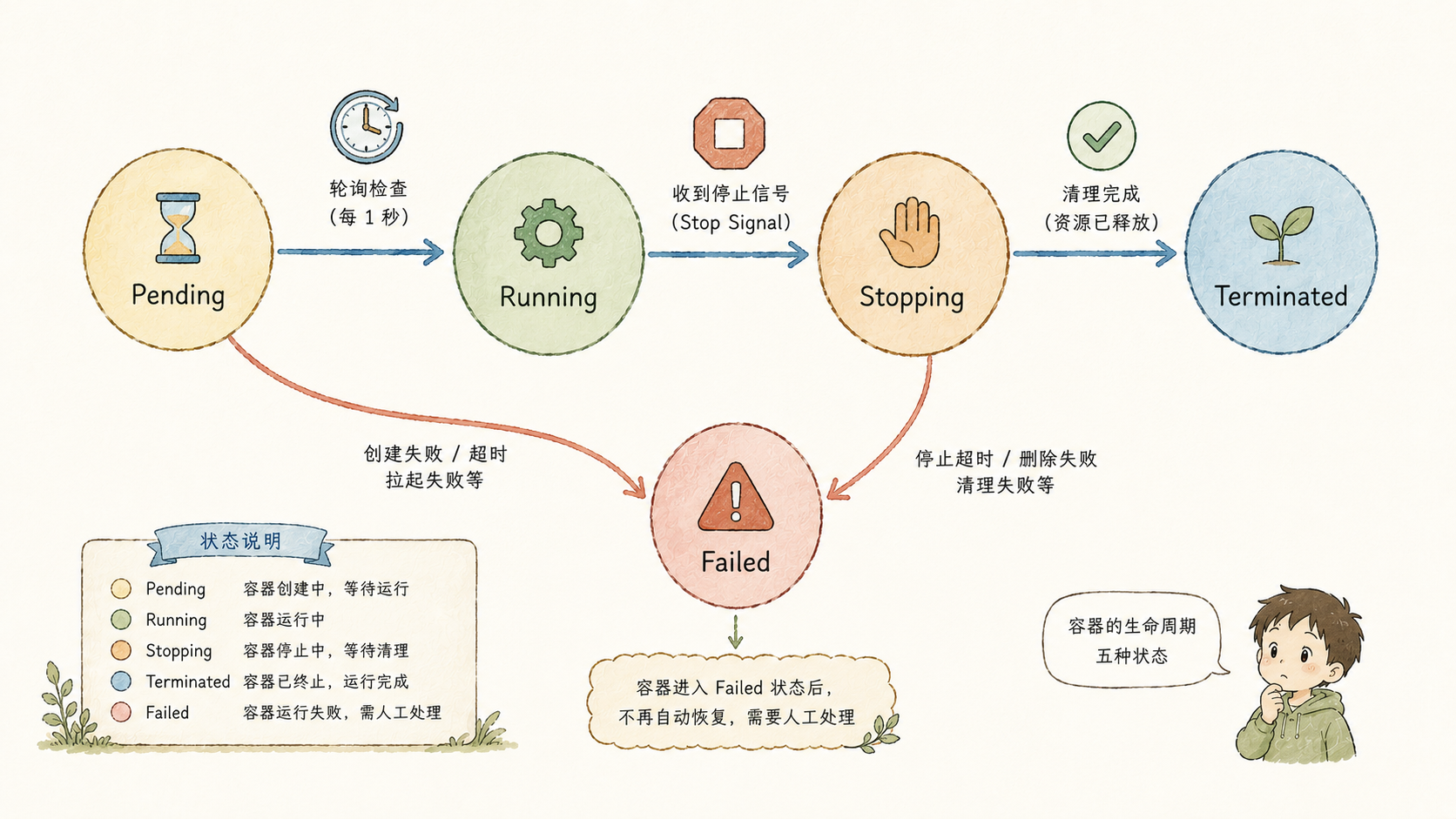
A Sandbox's lifecycle is a state machine: a container passes through five states from creation to eventual destruction, and the ContainerState enum spells this out clearly:
const (
	StatePending    ContainerState = iota // Container is being created, waiting to become ready
	StateRunning                          // Container is running normally, accepting tool calls
	StateStopping                         // Container is stopping (docker stop has been issued)
	StateTerminated                       // Container has stopped and been removed
	StateFailed                           // An unrecoverable error occurred
)
The Start method has a key design choice: ask "ready yet?" repeatedly instead of trusting the answer the first time. Getting a container ID back from docker run -d doesn't mean the container is actually ready to do work yet, especially when pulling a new image or spinning up something heavier. So after Start obtains the dockerID, it enters a polling loop that checks every 200 milliseconds, repeatedly running docker inspect --format={{.State.Running}} until it sees true come back, or until StartTimeout (30 seconds by default) elapses without success, at which point it transitions to StateFailed:
for {
	out, inspectErr := c.run(startCtx, "inspect", "--format={{.State.Running}}", dockerID)
	if inspectErr == nil && out == "true" {
		break
	}
	select {
	case <-startCtx.Done():
		c.setState(StateFailed, fmt.Errorf("timed out waiting for container to become ready (%v)", c.cfg.StartTimeout))
		return c.err
	case <-time.After(200 * time.Millisecond):
	}
}
The Stop method embodies a different trade-off: it doesn't matter whether docker stop succeeds or not, because a docker rm is going to run next regardless.
_, _ = c.run(stopCtx, "stop", "-t", "5", dockerID)
_, _ = c.run(stopCtx, "rm", dockerID)
c.setState(StateTerminated, nil)
If a container has gotten stuck for some reason, docker stop might fail or time out, but the resources still need to be reclaimed — so both commands' return values are simply discarded (_, _ =), because regardless of whether the earlier step succeeded, execution ends up at StateTerminated either way. This is a "clean up the resources first, don't sweat getting every single step exactly right" approach: it's better to silently swallow one failed stop than to leave a container hogging resources indefinitely. There's also a small safeguard at the top of Stop: a container already in Terminated or Failed state returns nil immediately, avoiding redundant cleanup under concurrent calls.
Manager — Centrally Managing Sandboxes
The Manager is the manager for the entire Sandbox system, holding a map[string]*Container. Every method it exposes must be concurrency-safe, because the main agent and every Sub-Agent may all be simultaneously creating and destroying their own containers.
The core flow of Create is straightforward: generate a UUID, construct a Container, call Start to launch it, run an optional bootstrap command once startup succeeds, and only then record the container into the containers map:
func (m *Manager) Create(ctx context.Context, workDir string) (Environment, error) {
	id := generateID()
	run := cmdRunner(realCmdRunner)
	// ...(the test-injection runnerFactory branch is omitted)
	c := newContainer(id, workDir, m.cfg, run)
	if err := c.Start(ctx); err != nil {
		return nil, fmt.Errorf("sandbox: failed to start container: %w", err)
	}
	env := newDockerEnvironment(c.DockerID(), id, workDir, run)

	// Dependency bootstrap: after the container is ready but before the Agent
	// starts, run a one-time initialization command. It gets its own longer
	// timeout budget, and is fail-open (a failure only logs a warning, it
	// doesn't block creation).
	if cmd := strings.TrimSpace(m.cfg.BootstrapCmd); cmd != "" {
		m.runBootstrap(env, cmd, workDir)
	}

	m.mu.Lock()
	m.containers[id] = c
	m.mu.Unlock()
	m.notify()
	return env, nil
}
What's worth a closer look here is BootstrapCmd: after the container comes up but before the Agent actually starts working, it can run an initialization command first (say, pip install -e . -q to install project dependencies), given its own dedicated time budget that's far longer than a single bash command's timeout (10 minutes by default, controlled via the SANDBOX_BOOTSTRAP_CMD / SANDBOX_BOOTSTRAP_TIMEOUT_SECS environment variables). This step is fail-open: a dependency installation failure won't cause Create to error out — at worst, the Agent's environment just isn't fully set up when it starts working — it degrades gracefully instead of blocking. This seam is left in place for the future, so that when hooking up official images pre-loaded with dependencies (like the per-instance repo images in SWE-bench), all it takes is pairing an image with a command, without Sandbox having to guess what needs installing on its own.
DestroyAll's implementation is worth a closer look too: instead of directly iterating the map and synchronously calling Stop one by one, it first pulls all the containers out and clears the map while holding the lock, releases the lock, and only then uses a sync.WaitGroup to stop them concurrently:
m.mu.Lock()
cs := make([]*Container, 0, len(m.containers))
for _, c := range m.containers {
	cs = append(cs, c)
}
m.containers = make(map[string]*Container)
m.mu.Unlock()

var wg sync.WaitGroup
for _, c := range cs {
	wg.Add(1)
	c := c
	go func() {
		defer wg.Done()
		_ = c.Stop(ctx)
	}()
}
wg.Wait()
Writing it this way sidesteps two pitfalls: first, the lock never stays held through slow operations like docker stop/docker rm; second, the main agent's container and multiple Sub-Agents' containers can all be destroyed concurrently instead of queuing up one at a time — how fast defer sandboxMgr.DestroyAll(ctx) can run on process exit comes down entirely to this piece of code.
Orphan Container Reaping
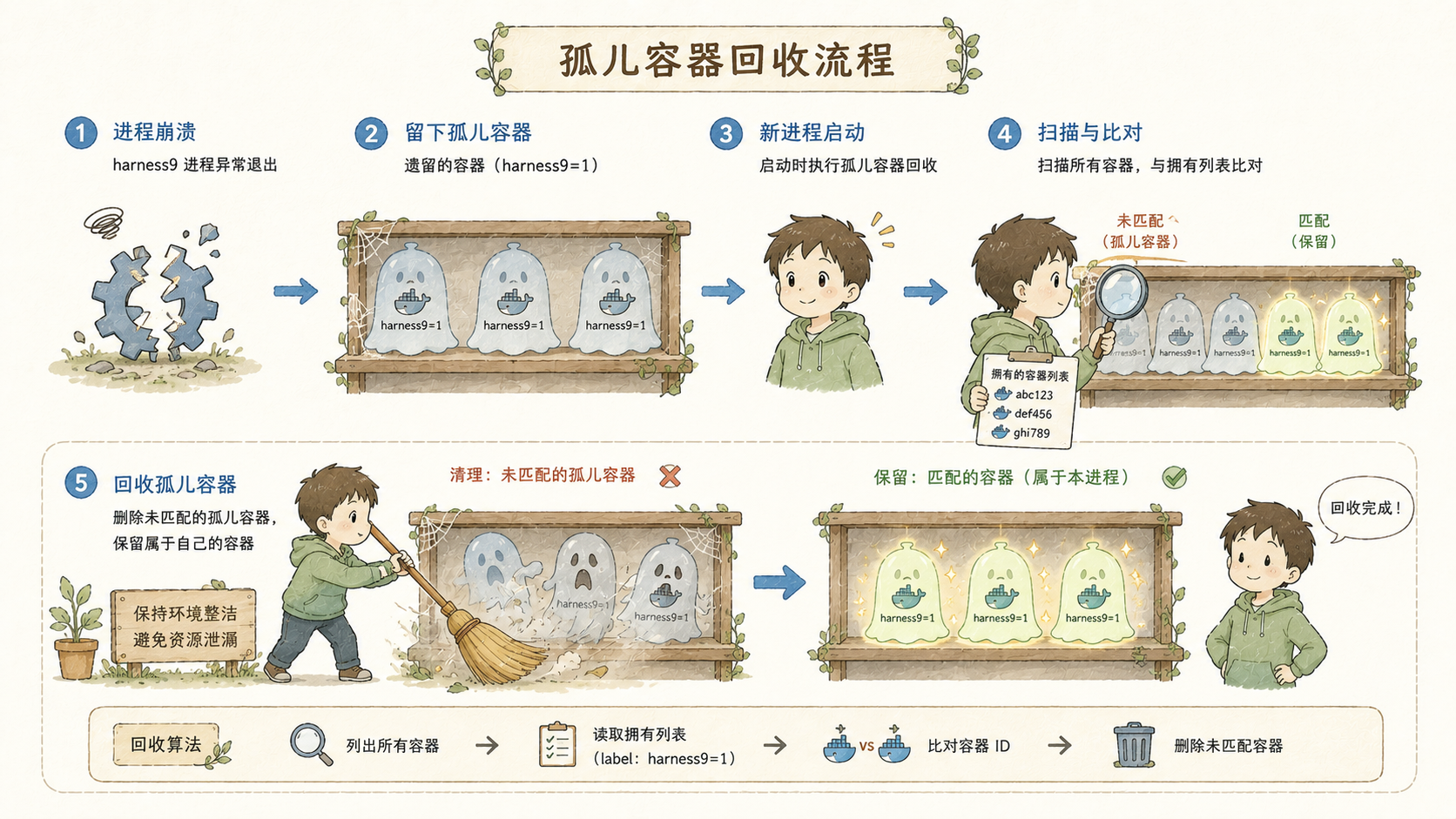
Under normal exit, defer sandboxMgr.DestroyAll(ctx) cleans up every container. But if the process gets forcibly killed by SIGKILL (say, a user manually running kill -9, or the OOM killer taking it out because the system ran out of memory), the defer never gets a chance to run, and the container is left behind in the Running state, becoming an unmanaged orphan. There's a comment in manager.go specifically calling out this pitfall:
// The original implementation only cleaned up containers with status=exited;
// when the process is force-killed with SIGKILL, the defer never runs, and
// the container is left behind in the Running state — holding a bind mount
// to a tmpDir that's already been deleted, which causes VirtioFS to slow down
// on macOS Docker Desktop, making subsequent container startups time out.
This is a real pitfall that was actually hit in practice: a leftover container has a bind mount pointing at a temp directory that no longer exists (the path the bind mount targets is gone), but the VirtioFS layer underneath Docker Desktop that's still tracking that stale mount keeps spinning uselessly, dragging down the whole VM's filesystem performance, and dragging down the next container's startup along with it — sometimes to the point of timing out outright. The fix is to run ReapOrphans once every time the process starts, using the label=harness9=1 tag to filter out every historically leftover container (regardless of its current state), and force-remove all of them with docker rm -f:
out, err := realCmdRunner(ctx,
	"ps", "-a",
	"--filter", "label=harness9=1",
	"--format", "{{.ID}}",
)
But there's a genuinely delicate point here: if multiple harness9 process instances happen to be running at the same time, ReapOrphans absolutely must not accidentally kill an active container that some other process is currently using. So ReapOrphans first checks which containers this particular Manager instance is currently managing (comparing the first 12 characters of the dockerID as a short hash), excludes those "friendlies," and only cleans up the genuinely unclaimed orphans:
m.mu.RLock()
owned := make(map[string]bool, len(m.containers))
for _, c := range m.containers {
	c.mu.RLock()
	if c.dockerID != "" {
		owned[shortDockerID(c.dockerID)] = true
	}
	c.mu.RUnlock()
}
m.mu.RUnlock()
ListAll also leaves a very explicit reminder: locks must always be acquired in the order Manager.mu (read lock) first, then Container.mu (read lock) — never the other way around, or it could deadlock. This kind of "lock ordering" note costs almost nothing to write in concurrent code, but it can genuinely be a lifesaver at the critical moment.
Wiring Sandbox into Tool-Calling
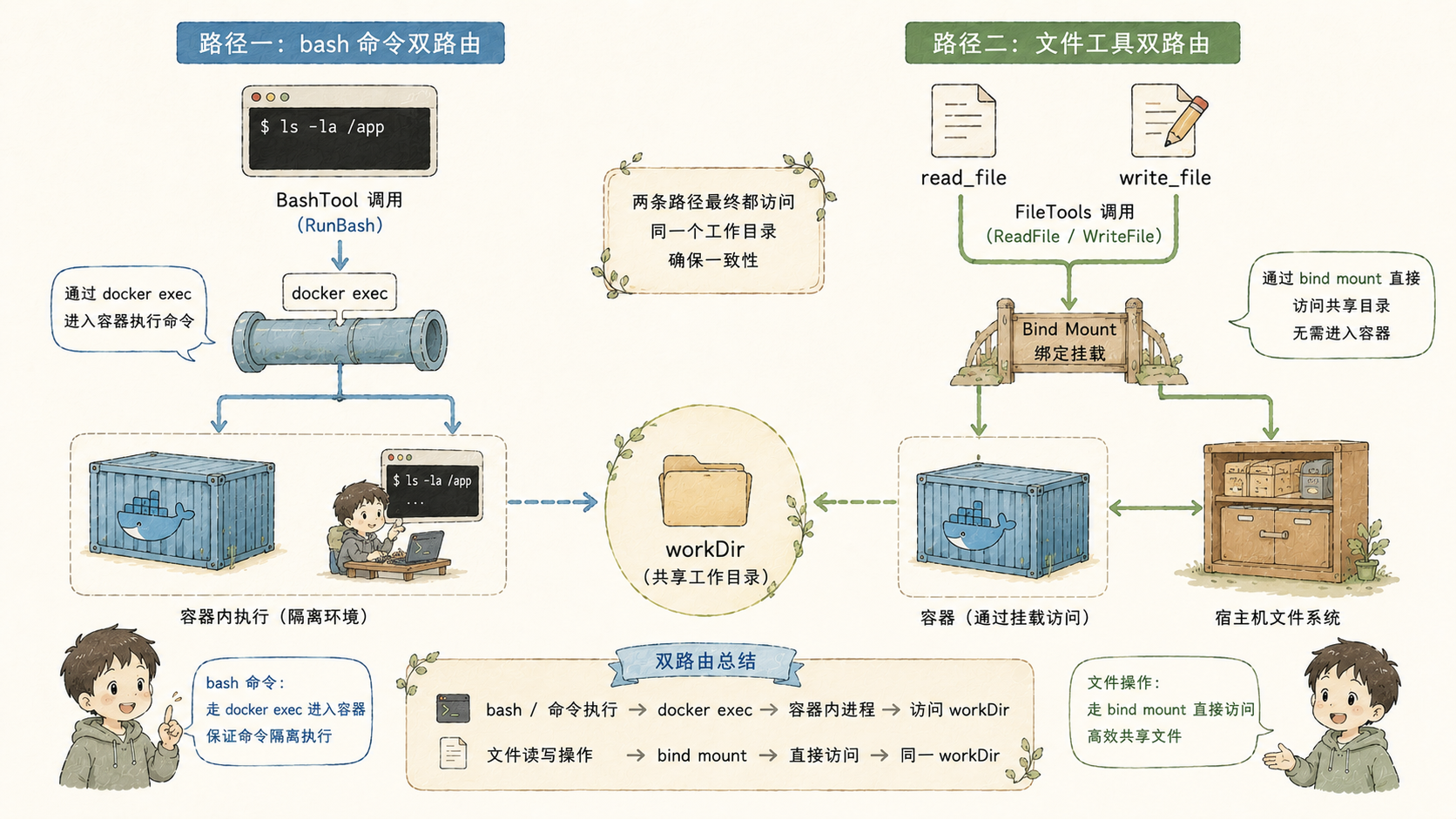
Sandbox isn't wired into the tool layer by crudely stuffing every single file operation into the container as well — instead, it splits into two completely different routes based on operation type.
bash commands route through docker exec. This is the one genuine case that requires running a process inside the container:
func (e *DockerEnvironment) RunBash(ctx context.Context, cmd, workDir string) (string, error) {
	out, err := e.run(ctx,
		"exec", "-w", workDir, e.containerID,
		"bash", "-c", cmd,
	)
	if err != nil {
		return fmt.Sprintf("execution error: %v\noutput:\n%s", err, out), nil
	}
	return out, nil
}
File reads and writes go through a bind mount on the host side. DockerEnvironment's ReadFile/WriteFile don't invoke any docker command at all — they're just plain os.ReadFile/os.WriteFile:
func (e *DockerEnvironment) ReadFile(_ context.Context, path string) ([]byte, error) {
	return os.ReadFile(path)
}
At first glance this design feels counterintuitive — it's called Sandbox, so why don't file operations go through the container? The answer is hiding in the mount argument used at container creation time:
"-v", fmt.Sprintf("%s:%s", c.workDir, c.workDir),Put simply, a bind mount takes the workDir folder on the host and "mounts" it as-is into the container at that exact same path — the /path/to/project the container sees and the /path/to/project on the host are literally the same files, backed by identical underlying storage. Since the filesystem is already shared, reading and writing directly on the host side gets exactly the same result as going through the container, so there's no need to take a detour through, say, docker exec cat or docker cp to reach into the container. This is a very grounded trade-off: docker exec itself has to spin up a new process, which has real overhead, whereas file operations through local syscalls are noticeably faster; and as for whether both sides stay consistent, the bind mount mechanism guarantees that naturally, with no need for the application layer to sync anything itself.
The comment on newDockerEnvironment spells out this design rationale clearly:
func newDockerEnvironment(containerID, id, _ string, run cmdRunner) *DockerEnvironment {
	// The workDir parameter is not stored: file reads/writes execute on the
	// host side via the bind mount, so DockerEnvironment has no need to hold onto the path.
	return &DockerEnvironment{...}
}
The three file tools (read_file/write_file/edit_file) are all wired up in main.go with the exact same sandboxEnv injected uniformly, via their respective ReadFileWithEnvironment/WriteFileWithEnvironment/EditFileWithEnvironment options:
tools.NewReadFileTool(workDir, tools.ReadFileWithEnvironment(sandboxEnv)),
tools.NewWriteFileTool(workDir, tools.WriteFileWithEnvironment(sandboxEnv)),
tools.NewBashTool(workDir, tools.WithEnvironment(sandboxEnv)),
tools.NewEditFileTool(workDir, tools.EditFileWithEnvironment(sandboxEnv)),
All four tools share the exact same sandbox boundary check (safePath()) — Sandbox only swaps out what's actually doing the execution/reading/writing behind each tool, and the path-safety logic underneath is completely unaffected.
The MainAgent's and SubAgent's Sandboxes Are Isolated From Each Other
Sandbox isolation granularity is per-Agent, not one shared global container. In main.go, the main agent calls sandboxMgr.Create once at startup:
sandboxEnv, sandboxErr = sandboxMgr.Create(ctx, workDir)while every Sub-Agent, inside Runner.Run, independently creates its own separate container, and destroys it once it's done:
if r.sandboxMgr != nil {
	sandboxEnv, err := r.sandboxMgr.Create(ctx, r.workDir)
	if err != nil {
		return SubAgentResult{}, fmt.Errorf("sandbox: failed to create environment for sub-agent: %w", err)
	}
	defer r.sandboxMgr.Destroy(r.baseCtx, sandboxEnv.ID())
	effectiveBaseTools = wrapToolsWithSandbox(r.baseTools, sandboxEnv, r.workDir)
}
What wrapToolsWithSandbox does is take the base tool set used by the Sub-Agent and re-wrap it, plugging in its own dedicated Environment:
func wrapToolsWithSandbox(ts []tools.BaseTool, env sandbox.Environment, workDir string) []tools.BaseTool {
	result := make([]tools.BaseTool, len(ts))
	for i, t := range ts {
		switch t.Name() {
		case "bash":
			result[i] = tools.NewBashTool(workDir, tools.WithEnvironment(env))
		// read_file / write_file / edit_file follow the same pattern
		default:
			result[i] = t
		}
	}
	return result
}
In other words, if the main agent delegates three concurrent Sub-Agents in one go, at any given moment there are actually four completely independent containers running — one for the main agent, and one for each Sub-Agent. A destructive command running inside one Sub-Agent physically cannot touch the main agent's container or any other Sub-Agent's container. defer r.sandboxMgr.Destroy(r.baseCtx, sandboxEnv.ID()) guarantees that whether the Sub-Agent's task succeeds or fails, its container is reclaimed the moment it finishes, instead of hogging resources indefinitely. This is how full isolation between the main agent and Sub-Agents gets achieved.
Minimizing Sandbox Privileges
The arguments passed at container startup are the core of the entire Sandbox security model, and it's worth unpacking every single line of the docker run call inside Start:
c.run(startCtx,
	"run", "-d",
	"--name", "harness9-"+c.id,
	"--label", "harness9=1",
	"--cap-drop", "all",
	"--cap-add", "DAC_OVERRIDE",
	"--cap-add", "SETUID",
	"--cap-add", "SETGID",
	"--security-opt", "no-new-privileges:true",
	"--pids-limit", fmt.Sprintf("%d", c.cfg.PidsLimit),
	"--cpus", c.cfg.CPUs,
	"--memory", c.cfg.Memory,
	"--tmpfs", "/tmp:size=256m,nosuid,noexec,nodev",
	"-v", fmt.Sprintf("%s:%s", c.workDir, c.workDir),
	c.cfg.Image,
	"sleep", "infinity",
)
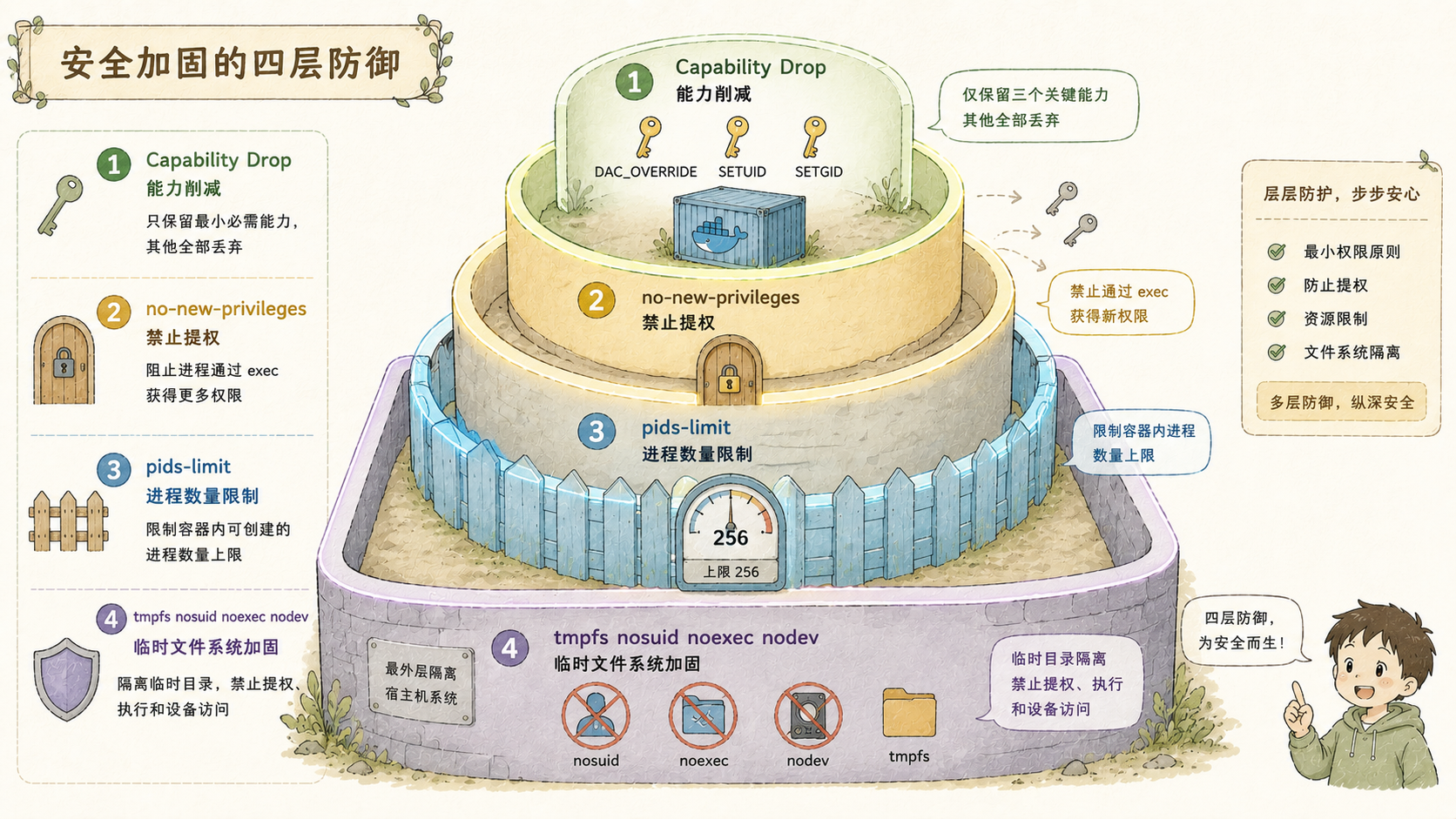
--cap-drop all is only the starting point, not the destination. You can think of Linux capabilities as splitting the giant "root privilege" bundle into dozens of individual switches: can it bind a privileged network port, can it read and write raw network packets, can it load a kernel module... each one is an independent toggle. With all of them switched off, even a root user inside the container can't do much more than an ordinary user. But leaving zero switches on causes problems: package-installing tools like apt install and pip install frequently need to temporarily change a file's owner during installation, or handle setuid-flagged binaries (like sudo itself, or certain dynamic-library hooks that need to temporarily elevate privileges). These actions depend on three specific switches:
DAC_OVERRIDE: bypasses the normal file read/write/execute permission checks — needed when a package manager unpacks files or overwrites files in system directoriesSETUID/SETGID: lets a process switch its own user/group identity — some install scripts (like postinst hooks) need to run as a specific user, and this is how they do it
Together, these three switches add up to exactly the minimal permission set required for tools like apt and pip to work properly — not something left open just because "we might as well leave a few extras on for convenience." Riskier switches like SYS_ADMIN (which allows direct disk device access), NET_BIND_SERVICE (which allows binding privileged ports), and SYS_MODULE (which allows loading kernel modules) stay switched off at all times and are never enabled.
--security-opt no-new-privileges:true guards against a different attack vector: even if some binary inside the container already carries a setuid flag (meaning executing it can temporarily elevate privileges), this option blocks the process from gaining higher privileges than it started with via execve. This is the second line of defense — even if the tightened permissions upstream get worked around somehow, this layer still holds the line.
--pids-limit 256 exists specifically to guard against fork bombs (a process bomb — a script that maniacally replicates itself). A classic fork bomb, or a runaway recursive script, could blow up the host's entire process table if the container doesn't cap the process count, freezing the whole machine solid; PidsLimit hard-caps this at 256, so the moment the process count inside the container exceeds that number, new process creation simply fails, and the blast radius is locked down firmly inside that one container.
--tmpfs /tmp:size=256m,nosuid,noexec,nodev is a dedicated safeguard for the /tmp directory — a location that's naturally attackers' favorite stepping stone. nosuid disables setuid flags on any files in there even if present, noexec outright forbids executing any binary from that location (a lot of attack chains follow the pattern of writing a malicious program to /tmp first, then executing it from there), and nodev forbids creating device files there. Together, these three options turn /tmp into a space that can only store things, with no way to use it to cause trouble.
Everything Stays the Same When SANDBOX_ENABLED=false
SandboxConfig.Enabled reads from the SANDBOX_ENABLED environment variable by default, and only turns off when it's explicitly set to "false":
Enabled: strings.ToLower(os.Getenv("SANDBOX_ENABLED")) != "false",In main.go, the Manager and its containers only get created when sandboxCfg.Enabled is actually true; otherwise sandboxEnv simply stays nil, and every tool takes the old local path. This default is itself worth calling out: Sandbox is on by default, not off by default — harness9 treats container isolation as something that should obviously be present in a production environment, not a bonus feature users have to discover and switch on themselves.
If container startup fails for some reason (say, the Docker daemon isn't installed locally at all), main.go catches the error and degrades gracefully:
if sandboxErr != nil {
	log.Print(logfmt.FormatMsg("main", fmt.Sprintf("sandbox startup failed, falling back to local process mode: %v", sandboxErr)))
	sandboxMgr = nil
	sandboxEnv = nil
}
This is a degradation path: a Sandbox initialization failure doesn't bring the whole program down — instead it falls back to local execution mode, while printing out the failure reason for easier troubleshooting. Combined with the Environment interface's default semantics described earlier — "pass nil and you get the local path" — "degrading" here, at the code level, really just amounts to leaving a pointer empty, with no extra special-case branch to handle.
Displaying Sandbox Status in the TUI
The TUI renders a SandboxBar below the status bar, which only appears when there's an active Sandbox present:

func (m tuiModel) renderSandboxBar() string {
	if len(m.sandboxes) == 0 {
		return ""
	}
	// ...
	for i, info := range m.sandboxes {
		label := "main"
		if i > 0 {
			label = fmt.Sprintf("sub-%d", i)
		}
		// ...
	}
}
The four states map to four colors: Running is green, Pending is yellow, Stopping/Terminated are gray, and Failed is red. This mapping directly reuses the ContainerState enum — the TUI doesn't need to understand how the state machine transitions, it just maps a state value to a color. Once again, the presentation layer and the underlying domain logic are kept apart via an interface/enum, so the TUI doesn't need to maintain its own duplicate copy of state logic. Manager.WithUpdateNotify pushes state changes to the TUI through a channel, and the sandboxNotifyCh notification channel must be registered before the very first call to Create — otherwise the initial state notification at startup gets dropped because the callback isn't wired up yet. This is a timing pitfall that main.go specifically calls out with a comment.
Closing Thoughts
Let's walk back through the whole thread. The Agent's unrestricted bash tool is set by the YOLO philosophy — trust the LLM, but trust it with a safety net. That raises the first question: should you isolate it at all? Yes, and you don't need to go overboard: Docker's namespaces plus capability trimming are enough to block the main risk categories — "deleted the wrong files," "installed a mess of dependencies," "process spiraled out of control" — with no need for the heavy-duty gear that gVisor or Firecracker bring to bear for mutually untrusted multi-tenant scenarios.
With the isolation approach settled, the next question is how the container stays alive. Container faithfully cycles through its five states; Start polls repeatedly to confirm the container is genuinely up; Stop cleans up resources regardless of whether the earlier step succeeded; Manager uses locking to guarantee concurrent create/destroy operations never collide; ReapOrphans specifically picks up the orphans left behind when a process gets force-killed. Only once containers can be reliably born and reliably die does it become time for the next step: hooking the Agent's existing tools in seamlessly. bash goes through docker exec, files go through a bind mount — two different routing mechanisms, yet not a single line of tool code needed to change, because the Environment interface strips "where does this actually run" out of the tool logic entirely. Finally it comes down to permissions: --cap-drop all as the baseline, keeping only the three switches that apt and pip actually need to function; pids-limit guarding against fork bombs; the tmpfs mount options turning /tmp into a place that can't be used to cause trouble. Behind every single parameter is the same recurring question: does this feature actually need this privilege?
All of these layers are ultimately doing the same thing: first pin down the real boundary of the problem, then apply exactly enough mechanism to cover it — any more is waste, any less is a liability. This way of thinking shows up more than once in harness9: the Environment interface splits domain logic apart from execution mechanics, the ContainerState state machine gets picked up directly by the TUI as a color-mapping table, cmdRunner is defined as a function type specifically so tests can swap out the real docker command. Individually these all look like small decisions, but taken together, what they're doing is making sure each layer only has to worry about its own concern, and everything else gets handled by an interface underneath. This way of thinking isn't only useful for Sandbox — any system that has to strike a balance between "security" and "can it still actually get work done" probably has to start by asking the same question: what exactly are we defending against, and what's the minimum tightening needed to actually defend against it?
If you were the one designing this permission model, would you leave one more capability turned on among those three --cap-add entries, or would you strip them all out entirely and switch to a read-only static-analysis mode instead?