Context Engineering: How an Agent Stays Sane Within a Limited Token Window
About harness9
harness9 is a Local-First, lightweight, feature-complete, production-ready general-purpose Go Agent framework.
Starring the repo is the most direct way to support this open-source work — issues and PRs are very welcome.
TL;DR
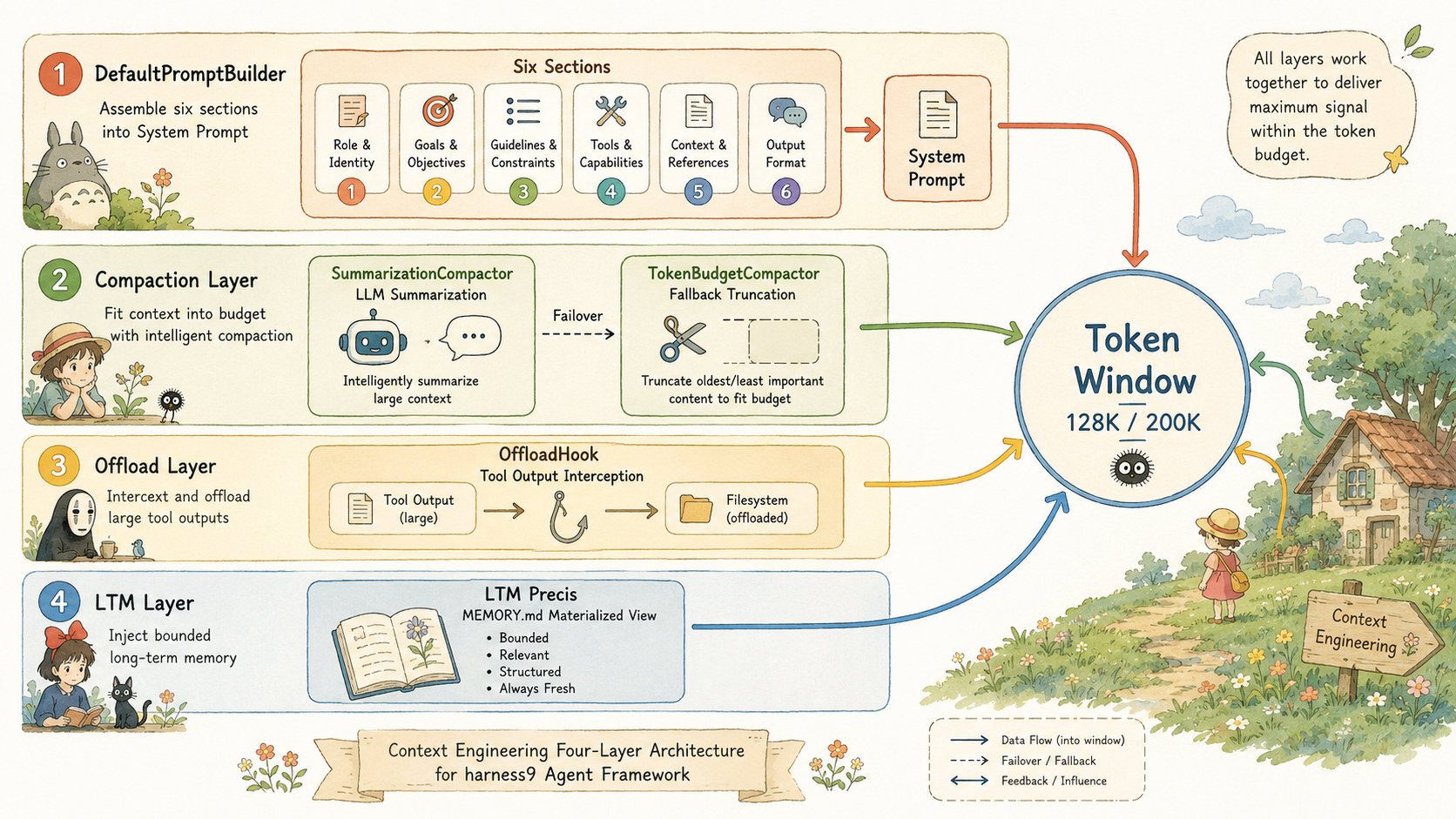
- Context Engineering = a four-layer pipeline: System Prompt assembly → context compaction → large-output offloading → bounded Long-Term Memory injection, with each layer independently removable
- DefaultPromptBuilder calls
time.Now()again on everyBuild()to inject the current date, preventingweb_searchfrom generating stale queries; the System Prompt is never persisted to SQLite, so the prompt version can evolve freely - Dual compaction: SummarizationCompactor (default, LLM summary + incremental merge) triggers at the 80% threshold; TokenBudgetCompactor (fallback, character truncation) takes over when the LLM is unavailable; both call
repairOrphanedToolPairsto fix orphaned tool pairs required by the Anthropic API - OffloadHook intercepts tool outputs longer than 10,000 characters, writes them to
.harness9/tool_results/, and keeps only a paginated reference in context; it is fail-open, so a write failure never interrupts the agent loop - MEMORY.md materialized view: top-30 entries + a 5KB hard cap + UTF-8 rune-boundary truncation — a triple defense against token bombs; the
ltmReaderclosure guarantees that "what's written is visible next turn" - Separation of
contextHistory(complete, persisted) fromcompactedHistory(temporary, LLM-facing view): compaction is lossless to the persisted layer — every turn derives its compacted view from the complete history, so information loss never stacks up
What you'll learn from this post
- How DefaultPromptBuilder assembles six heterogeneous pieces of information into a structured System Prompt, and why every
Build()call re-invokestime.Now() - How SummarizationCompactor's incremental update mechanism works — why it doesn't re-summarize from scratch every time, but instead feeds the previous summary back to the LLM for merging
- How TokenBudgetCompactor's
repairOrphanedToolPairsbidirectional repair avoids 400 errors from the Anthropic API - The fail-open design philosophy behind OffloadHook: a file-write failure must never interrupt the agent loop
- The bounded injection behind the MEMORY.md materialized view — top-30 entries, a 5KB hard cap, and UTF-8 rune-boundary truncation as a triple defense against token bombs
The token window is the Agent's working memory
An Agent running a long task faces a core tension: the LLM reasons over the full conversation history, but the token window is finite. The longer the history, the more accurate the reasoning — and the longer the history, the sooner it hits the ceiling.
This isn't merely an engineering problem; it's a constraint at the level of information theory. What goes into the token window, how it's arranged, and how much of it there is determines whether the Agent can still remember, at turn 50, which file it wrote at turn 3.
harness9 splits this problem into four layers:
- System Prompt assembly: before each turn begins, put the most important structured information at the front of the window
- Context compaction: when history exceeds budget, replace raw conversation with an LLM-generated summary
- Large-output offloading: when a single tool output exceeds a threshold, write it to the file system and keep only a reference in context, letting the Agent decide for itself when to reload it
- Long-term memory injection: persistent knowledge that spans sessions, injected into the current window within bounds
Each layer is independent — it can be turned off on its own, or stacked with the others.
DefaultPromptBuilder: a System Prompt assembled from six sections
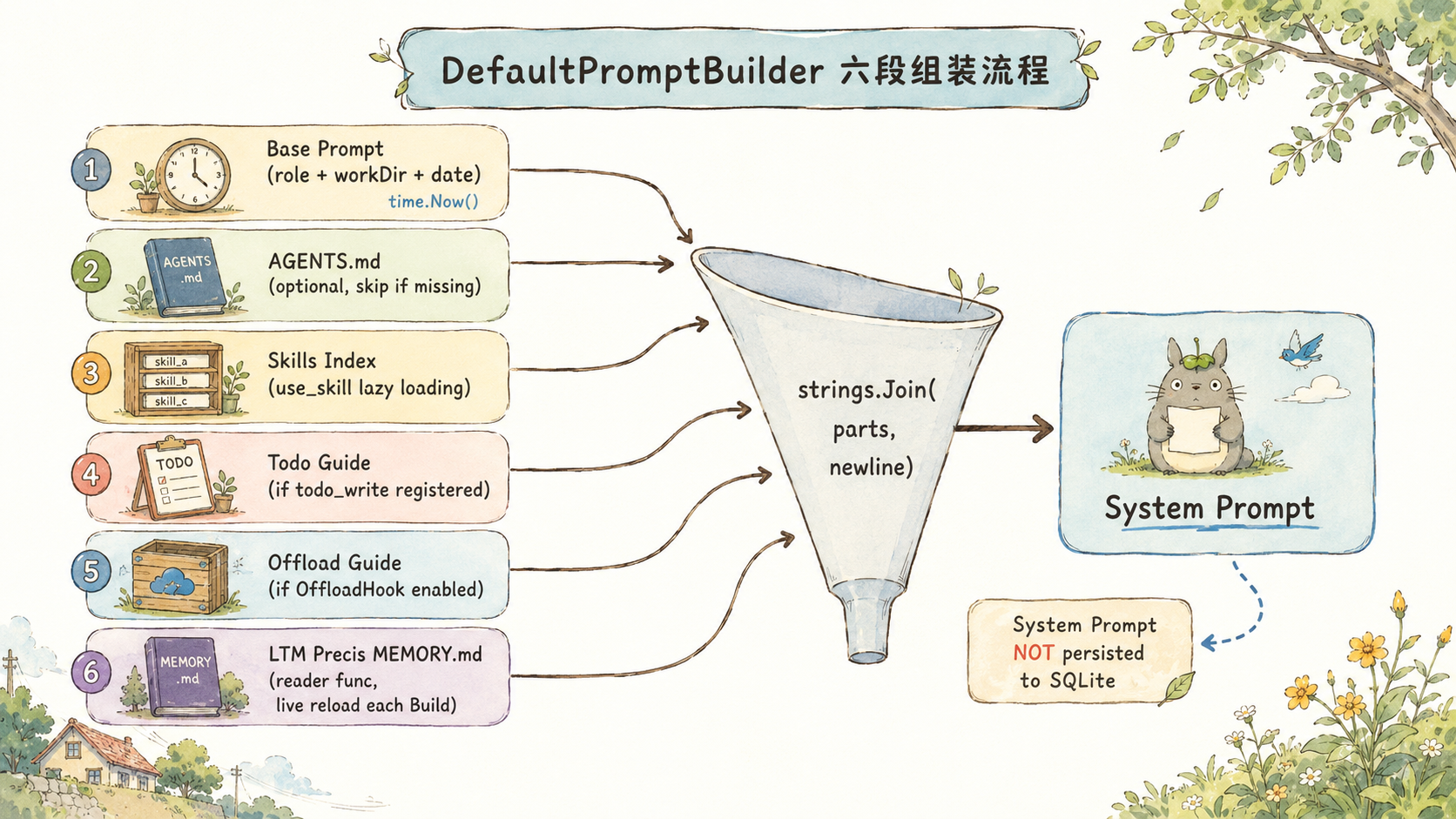
In most frameworks the System Prompt is a single hardcoded string — change one word and you need to redeploy. harness9's DefaultPromptBuilder instead treats it as a dynamic assembly: six independent sections, concatenated on demand every time Build() runs.
func (b *DefaultPromptBuilder) Build() string {
    var parts []string

    // 1. Base prompt: role definition + working directory + current date + working principles
    parts = append(parts, fmt.Sprintf("...\nWorking directory: %s\nCurrent date: %s\n...",
        b.workDir, time.Now().Format("2006-01-02")))

    // 2. AGENTS.md: the user's project conventions; silently skipped if absent
    if data, err := os.ReadFile(agentsPath); err == nil && len(data) > 0 {
        parts = append(parts, "## Project Conventions (AGENTS.md)\n\n"+string(data))
    }

    // 3. Skills index: the LLM loads full content on demand via use_skill
    if b.skillsIndex != nil && !b.skillsIndex.IsEmpty() {
        parts = append(parts, "## Available Skills\n\n"+b.skillsIndex.Summary())
    }

    // 4-6. todo guidance / offload retrieval / long-term memory (injected per configuration)
    // ...
    return strings.Join(parts, "\n\n")
}
A few design decisions worth calling out:
time.Now() is called on every Build(), not cached in the constructor. The reason is that runLoop rebuilds the System Prompt on every turn — if the Agent has been running for two hours, the System Prompt at turn 200 should carry the current date, not the date it started. This directly affects the query quality of the web_search tool: if the LLM generates search terms using a stale date, the results will be stale too.
AGENTS.md is silently skipped when absent. This reflects the fail-open philosophy: the tool runs in an arbitrary user directory, so it can't assume AGENTS.md necessarily exists.
The System Prompt is never persisted to SQLite. loadHistoryWith re-injects the system message every time history is loaded, and saveHistoryWith only saves msgs[startLen:], skipping the system message. This lets the prompt evolve with configuration changes without locking historical data to a particular prompt version.
Dual compaction strategy: summarization first, truncation as fallback
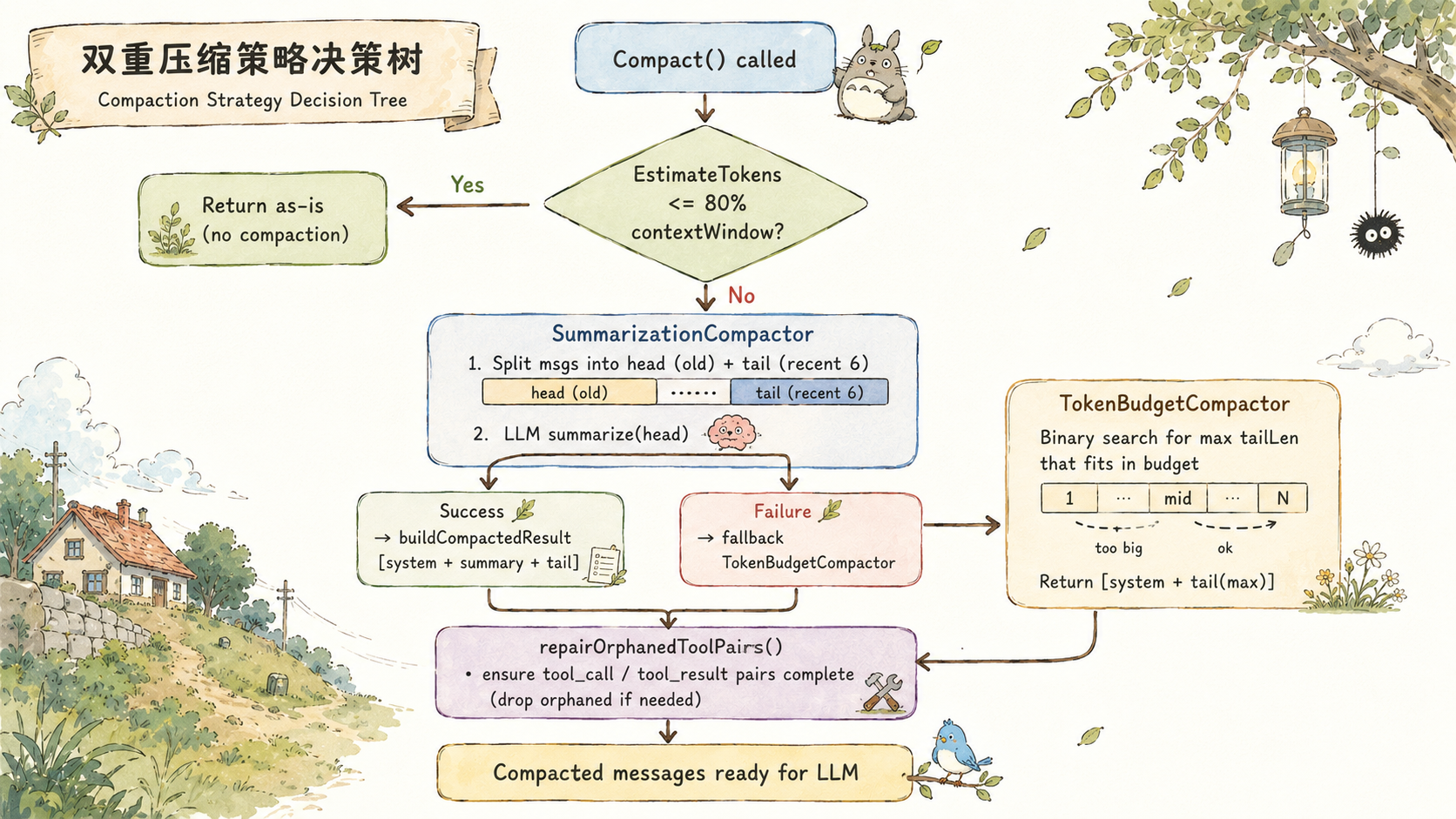
harness9's compaction layer has two implementations, reflecting two different engineering trade-offs.
SummarizationCompactor: LLM summarization that preserves semantics
SummarizationCompactor is the default strategy. When the estimated token count exceeds 80% of the context window, it sends old messages to the LLM to be compressed into a structured summary:
func (c *SummarizationCompactor) Compact(msgs []schema.Message) []schema.Message {
    if EstimateTokens(msgs) <= c.maxTokens() {
        return msgs  // below threshold, return as-is
    }
    // Split: head (old messages) | tail (most recent 6 messages, always kept)
    headEnd := len(rest) - minTail
    head, tail := rest[:headEnd], rest[headEnd:]

    // Extract long-term memory before compacting (fail-open, failure doesn't block compaction)
    if c.extractor != nil {
        c.extractor.Extract(head)
    }

    summary, err := c.summarize(head)
    if err != nil {
        return c.fallback().Compact(msgs)  // LLM failed, fall back to truncation
    }
    return c.buildCompactedResult(msgs[0], summary, tail)
}
The incremental update mechanism is the most valuable part of this design. If head already contains a summary message from a previous round (starting with [Conversation Summary]), summarize doesn't re-summarize everything from scratch — instead it feeds the old summary and the new conversation to the LLM together, asking it to merge and update:
if prevSummary != "" {
    userContent = fmt.Sprintf(incrementalTemplate, prevSummary, conversationText)
} else {
    userContent = fmt.Sprintf(summaryTemplate, conversationText)
}
The structure of incrementalTemplate is:
Update the existing summary by merging in new conversation content.
<previous-summary>
{previous summary}
</previous-summary>

New conversation to merge:
{new conversation text}
Why not re-summarize from scratch each time? Because doing so, across multiple rounds of compaction, produces compounding information loss — the second summary becomes a summary of the first summary, and key details decay at every layer. Incremental merging lets the LLM update against a complete previous summary, so less information is lost.
The summary's output format is fixed to five dimensions: Goal, Progress, Key Decisions, Next Steps, Critical Context. This isn't arbitrary — the Critical Context section is specifically for preserving file paths, variable names, and constraints that the LLM will need to reference precisely in later turns.
TokenBudgetCompactor: character truncation, always available
TokenBudgetCompactor is the fallback strategy. It never calls the LLM — it truncates purely based on character counts. The upside is that it doesn't depend on Provider availability; the downside is that old messages are simply discarded, with no semantic preservation.
func NewTokenBudgetCompactor(contextWindow int) *TokenBudgetCompactor {
    return &TokenBudgetCompactor{
        MaxTokens:       contextWindow * 80 / 100,
        MinTailMessages: 6,
    }
}
The 80% threshold isn't an arbitrary guess. The remaining 20% needs to cover tool definitions (the JSON Schema descriptions for tools like bash/read_file alone can consume 10-30K tokens), a buffer for the inherent error in the char÷4 estimate, and room for the LLM's generated output.
Repairing orphaned tool pairs: a hard requirement of the Anthropic API
After truncation there's one issue that must be handled: the Anthropic Messages API requires that every tool_call be paired with its tool_result. Truncation can produce two kinds of orphaned messages:
- Type A: a
tool_resultwhose correspondingtool_callwas truncated away - Type B: a
tool_callwhose correspondingtool_resultwas truncated away
repairOrphanedToolPairs resolves this with two passes:
func repairOrphanedToolPairs(msgs []schema.Message) []schema.Message {
    // Pass 1: collect all tool_call IDs issued by the assistant
    calledIDs := make(map[string]bool)
    resultIDs := make(map[string]bool)
    // ...

    for _, m := range msgs {
        // Drop orphaned tool_results
        if m.ToolCallID != "" && !calledIDs[m.ToolCallID] {
            continue
        }
        result = append(result, m)
        // Insert a placeholder tool_result for orphaned tool_calls
        if m.Role == schema.RoleAssistant && len(m.ToolCalls) > 0 {
            for _, tc := range m.ToolCalls {
                if !resultIDs[tc.ID] {
                    result = append(result, schema.Message{
                        Role:       schema.RoleUser,
                        Content:    "[Tool result unavailable: context was compacted]",
                        ToolCallID: tc.ID,
                    })
                }
            }
        }
    }
    return result
}
All three of SummarizationCompactor, TokenBudgetCompactor, and SlidingWindowCompactor call this repair function after compacting. The placeholder message content is [Tool result unavailable: context was compacted], so the LLM understands that history was compacted rather than assuming the tool execution failed.
OffloadHook: preventing a single output from blowing up the context
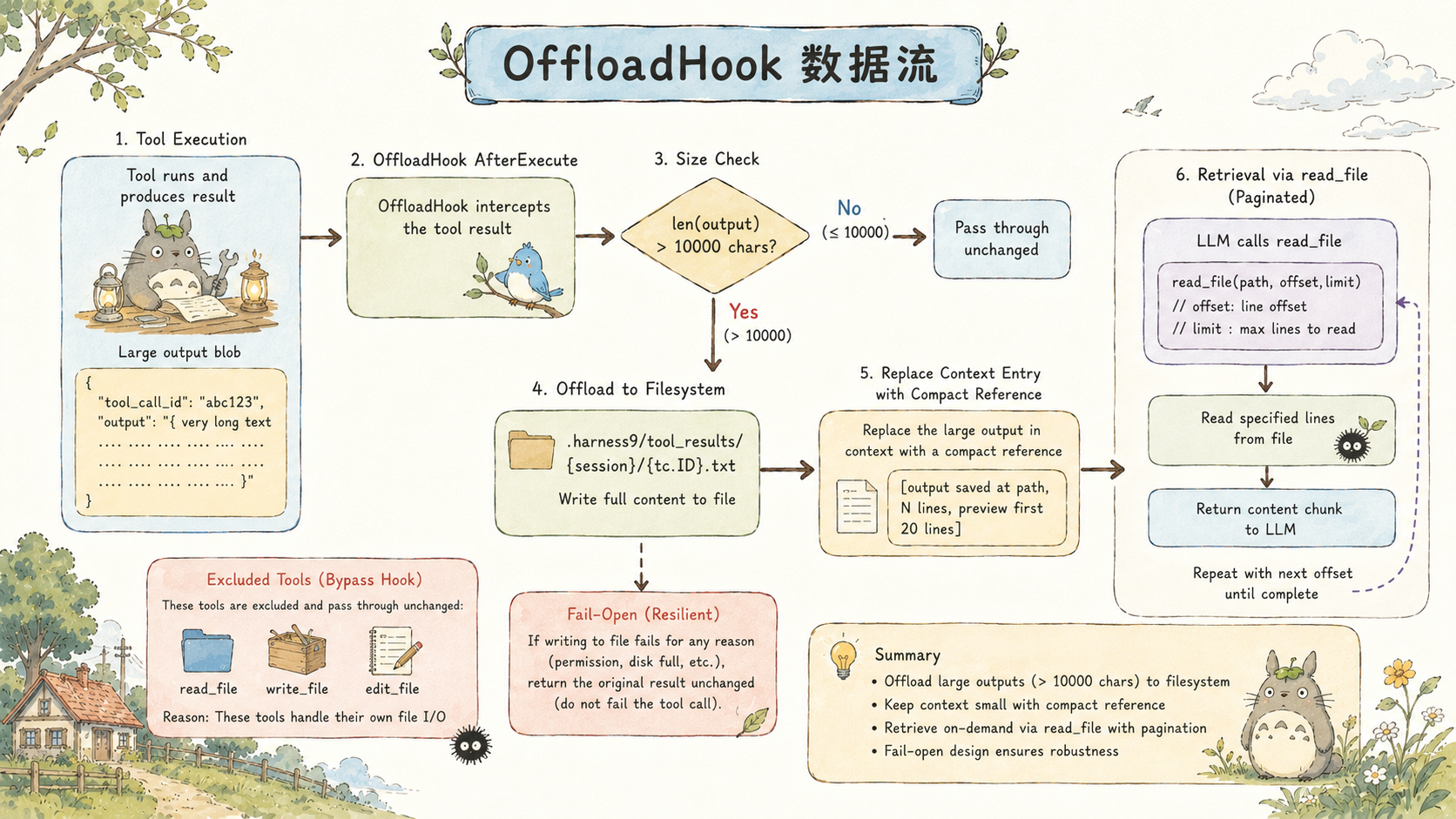
Context compaction alone doesn't guarantee safety. Consider this scenario: a single bash("cat large_file.log") call can produce hundreds of thousands of bytes of output. If that output goes straight into contextHistory, it not only eats a large chunk of the token budget, it also immediately triggers compaction — squeezing out valuable historical conversation.
To solve this, we introduced a hook mechanism: OffloadHook intercepts tool output after execution and, once it exceeds 10,000 characters, writes it to the file system and replaces the content in context with a reference:
func (h *OffloadHook) AfterExecute(_ context.Context, tc schema.ToolCall, result schema.ToolResult) schema.ToolResult {
    if offloadExcluded[tc.Name] {  // read_file/write_file/edit_file never trigger offload
        return result
    }
    if len(result.Output) <= h.threshold {
        return result
    }

    absPath := filepath.Join(h.workDir, ".harness9", "tool_results", h.sessionID, tc.ID+".txt")
    if err := os.WriteFile(absPath, []byte(originalOutput), 0600); err != nil {
        return result  // fail-open: write failed, return output as-is
    }

    result.Output = fmt.Sprintf(
        "[Output saved to %s, %d lines / %d bytes total.\n"+
        "Use the read_file tool with offset/limit parameters to page through it.\n\n"+
        "Preview (first %d lines):\n%s\n...(truncated)]",
        relPath, totalLines, len(originalOutput), previewEnd, preview,
    )
    return result
}
Three details worth noting:
The exclusion list: read_file, write_file, and edit_file never trigger offload. If a read_file output were itself offloaded, the LLM would call read_file to read that offloaded file, whose output would then get offloaded again — an infinite loop.
Files are named using tc.ID: the tool call ID is a unique identifier generated by the LLM, and it never repeats within a session. This means multiple large outputs within the same session are stored independently, without overwriting each other.
Fail-open: when os.WriteFile fails, it simply return results with the original output intact. A failure in OffloadHook never stops the agent loop — at worst, that particular large output ends up in context, and the next compaction pass will deal with it.
DefaultPromptBuilder includes a dedicated offload-retrieval guidance section that tells the LLM how to use read_file with offset/limit to page through offloaded files. This is the protocol layer between the LLM and the file system — the LLM knows where large outputs live and how to retrieve them on demand.
Where LTM meets Context: the MEMORY.md materialized view
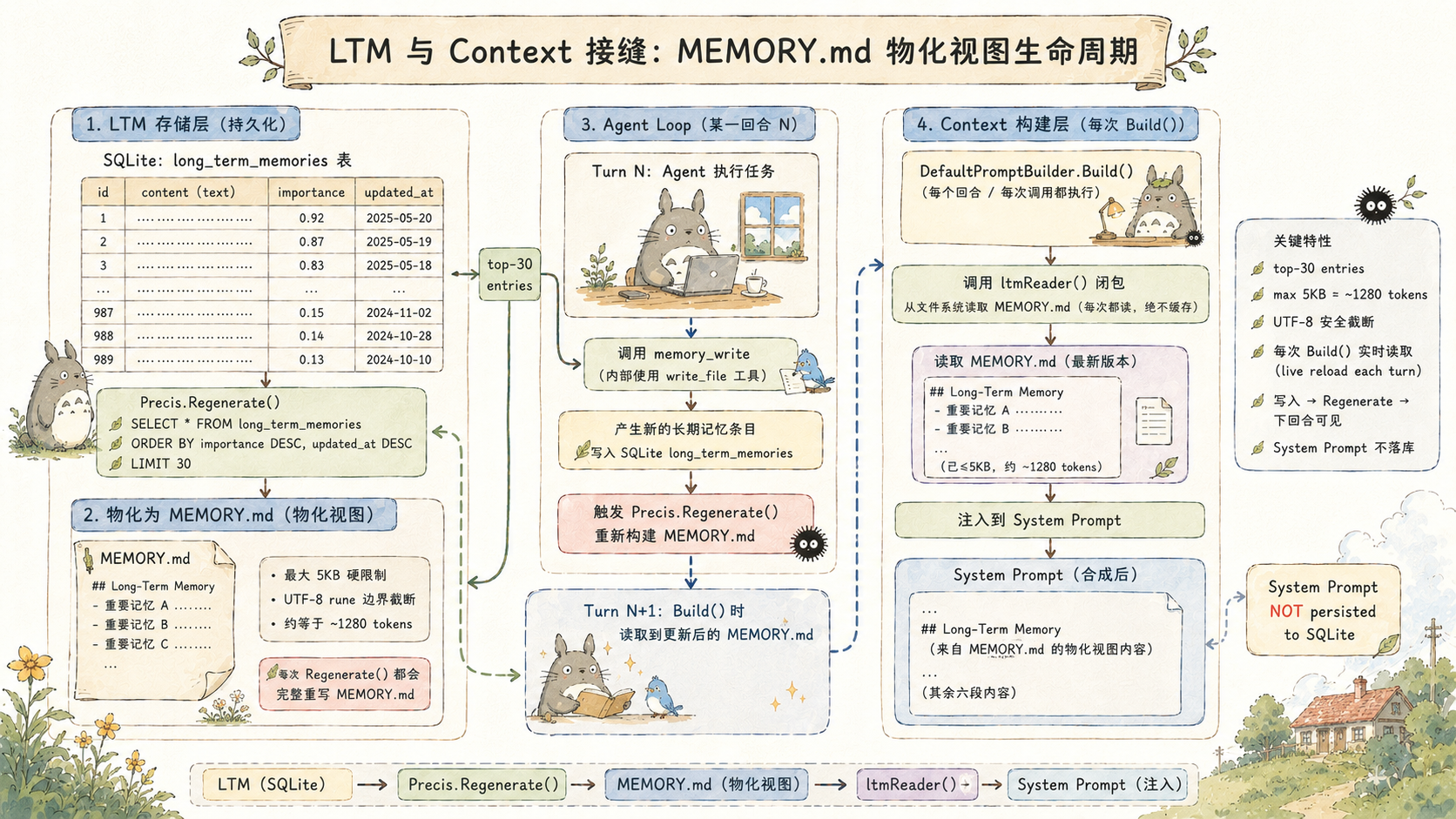
Long-Term Memory (LTM) is stored in SQLite's long_term_memories table, persisted across sessions. The question is: how do you inject these memories into the current context without creating a token bomb?
Dumping every memory entry straight into the System Prompt would be wrong — memories accumulate over time, and eventually they'd consume a substantial share of the token window.
harness9's answer is the MEMORY.md materialized view. Precis pulls the top-30 highest-value entries from the Store (ranked by importance) and renders them into a bounded Markdown file:
const precisMaxEntries = 30

func (p *Precis) Regenerate(ctx context.Context) error {
    entries, err := p.store.List(ctx, precisMaxEntries)  // top-30
    // ...
    content := renderPrecis(entries, p.maxBytes)          // maxBytes defaults to 5120
    return os.WriteFile(p.path, []byte(content), 0600)
}

func truncateUTF8(s string, maxBytes int) string {
    if len(s) <= maxBytes {
        return s
    }
    const marker = "\n…(truncated)"
    // Truncate at a rune boundary, never splitting a multi-byte character
    // ...
}
The 5KB cap is a calculated choice: 5120 / 4 ≈ 1280 tokens, which is about 1% of a 128K window and under 0.7% of a 200K window. The cost of injection is acceptable, while still covering 30 structured memory entries.
The way DefaultPromptBuilder.Build() injects LTM is by accepting a reader closure, invoked fresh on every Build call:
func (b *DefaultPromptBuilder) WithLongTermMemory(reader func() string) *DefaultPromptBuilder {
    b.ltmReader = reader
    return b
}

// Inside Build():
if b.ltmReader != nil {
    if content := b.ltmReader(); content != "" {
        parts = append(parts, "## Long-Term Memory\n\n"+content)
    }
}
Why a closure instead of reading once at construction time? Because the memory_write tool writes new memories and rebuilds MEMORY.md while the agent is running, and the next loop iteration's Build() needs to read the latest version. The closure makes "what's written is visible next turn" a natural consequence, with no extra notification mechanism required.
WithMemoryNudge: defensive injection, never persisted
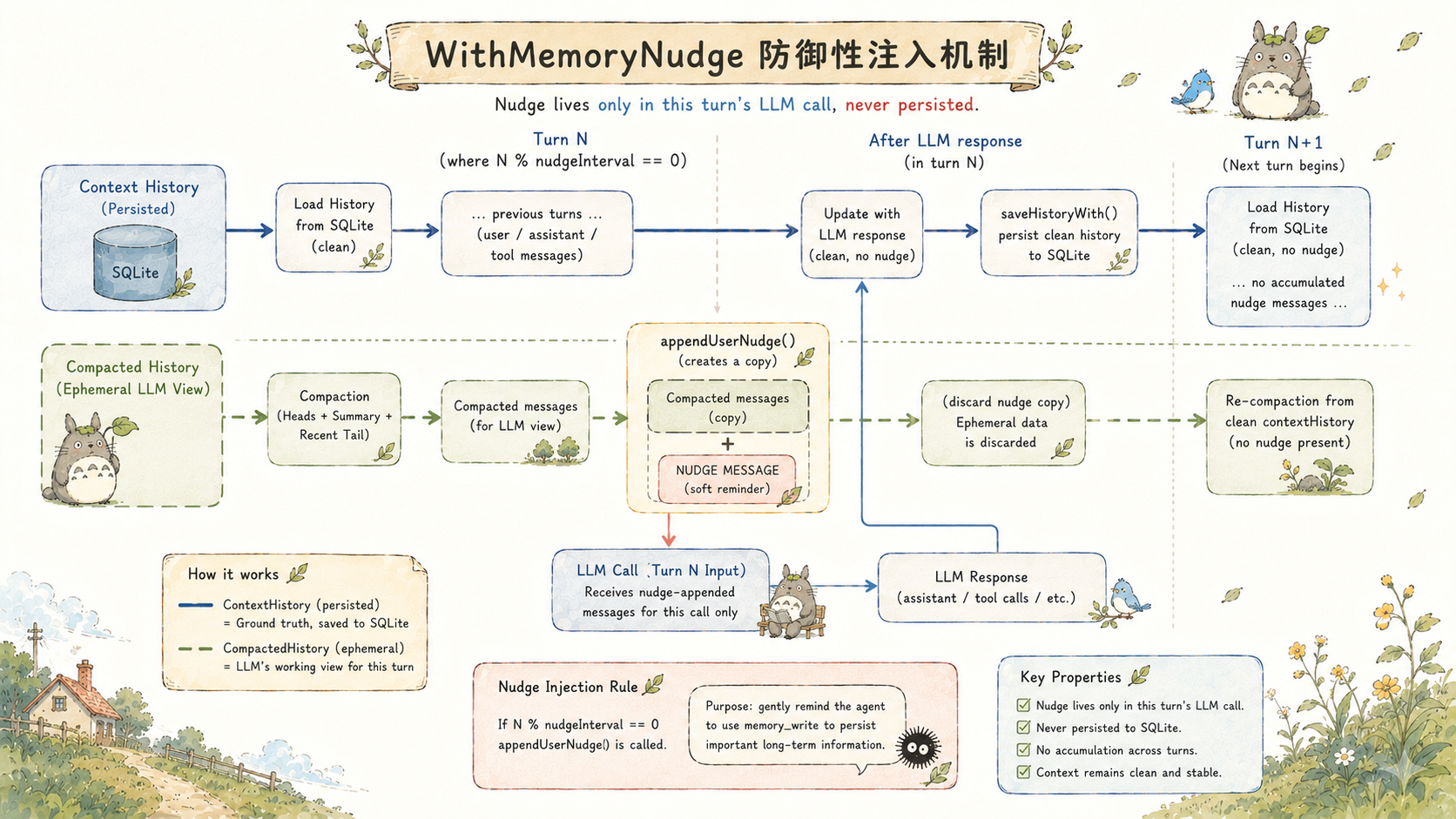
During long tasks, the LLM sometimes "forgets" to use memory_write to record important information after dozens of consecutive tool calls. WithMemoryNudge is a periodic reminder mechanism:
// Every nudgeInterval turns, append a reminder line to the temporary copy
if e.nudgeInterval > 0 && e.nudgeText != "" && turnCount%e.nudgeInterval == 0 {
    compactedHistory = appendUserNudge(compactedHistory, e.nudgeText)
}

func appendUserNudge(history []schema.Message, text string) []schema.Message {
    withNudge := make([]schema.Message, len(history), len(history)+1)
    copy(withNudge, history)
    return append(withNudge, schema.Message{Role: schema.RoleUser, Content: text})
}
The implementation of appendUserNudge embodies a key constraint: it operates on compactedHistory (the temporary view passed to the LLM), not on contextHistory (the complete history). The nudge message is never persisted by saveHistoryWith, never reappears when loadHistoryWith runs on the next turn, and never accumulates.
If the nudge message made it into persisted history, after dozens of turns the context would contain dozens of identical reminders — wasting tokens and confusing the LLM's reasoning. "Defensive copy, never persisted" is an engineering constraint here, not an implementation detail.
The same pattern is used for WithStallNudge — stagnation detection: when several consecutive turns pass without a call to write_file/edit_file (progress-making tools), it injects a single prompt to break the idle loop, then resets the counter.
Non-destructive compaction: two histories, two purposes
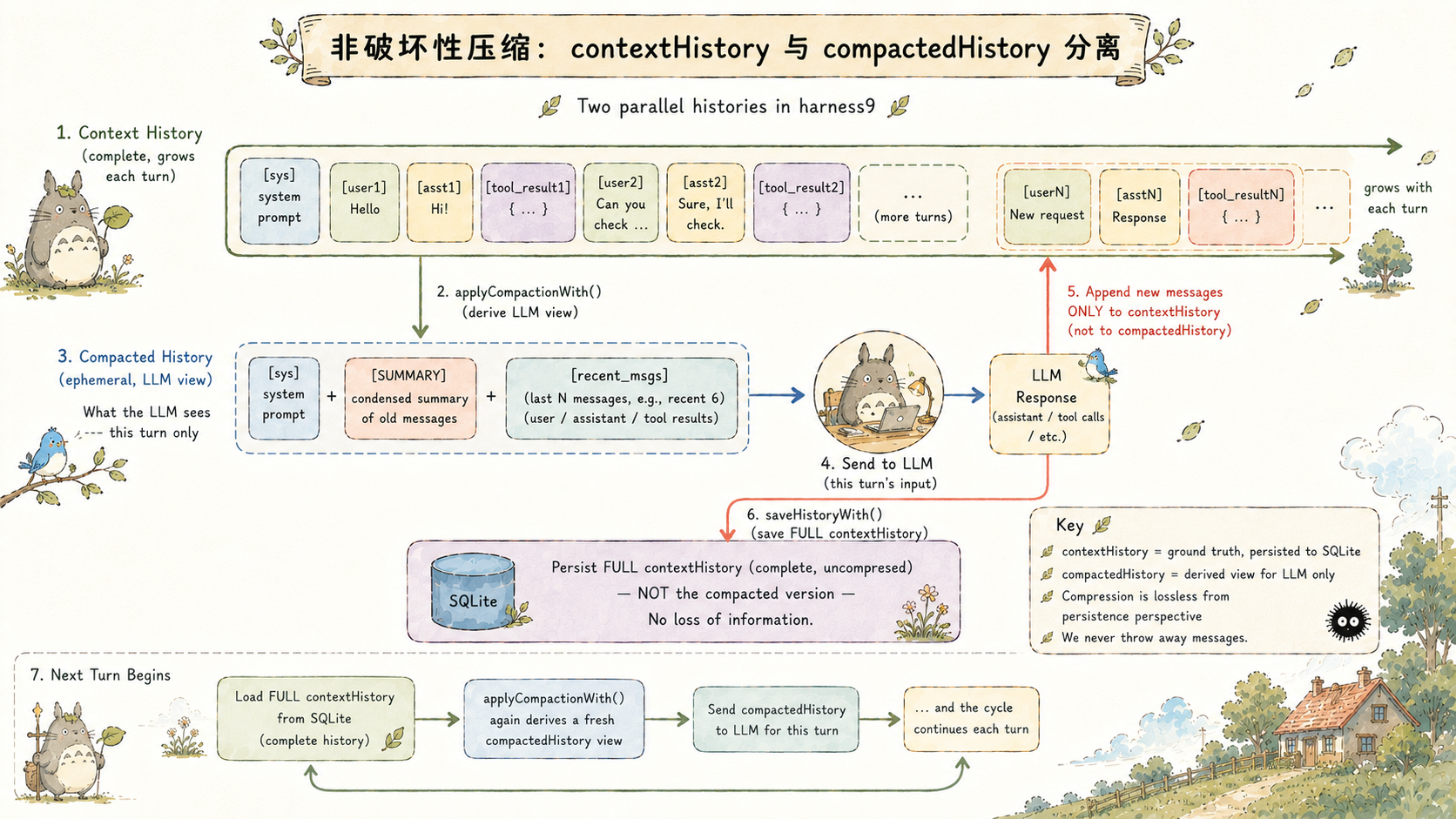
There's an easily overlooked design in harness9's compaction layer: contextHistory and compactedHistory are two separate variables, with different lifecycles and purposes.
// Inside runLoop:
contextHistory, startLen := e.loadHistoryWith(ctx, userPrompt, sess)

for {
    // compactedHistory: the compacted view derived each turn, sent only to the LLM
    compactedHistory := e.applyCompactionWith(comp, contextHistory)

    // The LLM only ever sees compactedHistory
    responseMsg, usage, err := e.generateWithRetry(ctx, em, turn, compactedHistory, availableTools)

    // contextHistory keeps accumulating the complete history (including everything pre-compaction)
    contextHistory = append(contextHistory, *responseMsg)
    // ...tool execution results appended to contextHistory...
}

// Persist the complete history, not the compacted view
e.saveHistoryWith(ctx, sess, contextHistory, startLen)
contextHistory is the complete conversation record, containing every original message, and it's what ultimately gets persisted to SQLite. compactedHistory is a temporary, trimmed version regenerated each turn and handed to the LLM.
This separation guarantees one thing: compaction is lossless. On the next round of compaction, applyCompactionWith operates on the complete history, so it can freely re-decide which messages to keep and which to summarize — rather than compacting an already-compacted result again (which would stack information loss). The trade-off is that the complete history is always held in memory, but for the vast majority of Agent tasks this cost is acceptable.
Two-phase token estimation updates
harness9 fires a token-usage notification both before and after each LLM call:
// Before the LLM call: char÷4 estimate, used for compaction decisions and initial display
em.tokenUpdate(totalTokens, e.contextWindow)

// LLM call
responseMsg, usage, err := e.generateWithRetry(...)

// After the LLM call: the actual usage from the API response, overwriting the estimate
if usage != nil && usage.InputTokens > 0 {
    em.tokenUpdate(usage.InputTokens, e.contextWindow)
}
char÷4 is a widely used approximation in the industry, typically accurate within ±10%, and avoids pulling in a dependency like tiktoken. This estimate is used to trigger compaction decisions — since the decision threshold already reserves a 20% buffer, a ±10% estimation error stays well within tolerance.
The actual InputTokens in the API response is far more precise, and is used to refresh the value shown in the TUI status bar. What the user sees in the TUI is: an estimate appears before the call, then refreshes to the precise value once the call completes.
TUI status bar color coding: contextTokens / contextWindow below 50% is green, 50-80% is yellow, 80% or above is red. Entering the red zone means the next turn is likely to trigger compaction.
Comparison with other frameworks
There are several interesting differences between harness9's Context Engineering and that of LangChain/LangGraph:
No vector database. LangChain's Memory module typically relies on vector embeddings for semantic retrieval (FAISS, Chroma, Pinecone). harness9's LTM uses SQLite FTS5 full-text search instead — no embedding model, no separate vector database process required. The trade-off is that retrieval quality is lexical rather than semantic, but for an Agent's memory retrieval most queries are exact keywords anyway (file paths, function names, project names), so lexical matching is generally sufficient.
Compaction is decoupled from storage. LangChain's ConversationSummaryMemory couples summarization and storage together, so a summarization failure means a storage failure. harness9's SummarizationCompactor is an independent compaction strategy — the storage layer (SQLiteSession) always holds the complete history, and compaction only ever happens at the level of "the view handed to the LLM."
A fail-open philosophy. OffloadHook write failures never interrupt the agent loop; saveHistoryWith failures only log a warning without terminating; LTM Extractor failures are also fail-open. harness9's design principle is: Context Engineering is an enhancement, not a core dependency. The LLM's reasoning ability is the core; memory and compaction are tools that help it work better.
The cost of this philosophy is that sometimes the Agent burns more tokens because an OffloadHook write failed, or loses a memory because an LTM write failed. But the agent loop never crashes — the task keeps moving forward.
Conclusion
At its core, harness9's Context Engineering is answering one question: how do you make a finite token window carry as much useful information as possible?
Six-section System Prompt assembly, dual compaction strategies, OffloadHook offloading, bounded MEMORY.md injection, defensive nudge injection — each layer is a partial answer to this question, and together they form a complete system for managing information density.
A question worth pondering: as LLM context windows keep growing (Gemini is already at 1M tokens), will these carefully engineered compaction strategies eventually become unnecessary? Or will Agent task complexity keep scaling right alongside them, meaning the information-density problem never truly goes away?