The Planning Module: Plan Mode, TodoStore, and Execution Automation
About harness9
harness9 is a local-first, lightweight, fully-featured, production-ready general-purpose Go Agent framework.
⭐ Stars are the most direct way to support open-source work — issues and PRs are welcome.
TL;DR
harness9's Planning module moves control over "what the LLM is allowed to do" from the prompt down into the tool schema; it turns the check for "is the LLM actually doing the work" from runtime observation into upfront rejection; and it turns the judgment of "is execution stuck" from manual intervention into a stagnation counter. Each of these three concerns is handled at the layer best suited for it — nothing has been pushed up or down unnecessarily.
What you'll learn
- Why Plan Mode uses a hard tool-layer whitelist filter instead of telling the prompt "don't create files" — and what that distinction means for agent engineering
- Why TodoStore chose full-replace semantics over an incremental API, and the data-race reasoning behind its "double copy" strategy
- How the
todo_writeanti-cheat validation evolved from a real bug (11 tasks batch-completed at once) into a "threshold of 1" design decision - Why stagnation detection counts
doneitems rather thanpendingitems to judge progress - FilePlanWriter's path strategy: why git repos and non-git repos persist plans to different locations
Plan Mode: a gate, not a sentence
Most agent frameworks implement a "planning phase" by adding a line to the prompt: "You are now in planning mode — don't modify files, only analyze." This is a soft constraint. The LLM can forget it, can be "lured" past it by tool examples in the historical context, or can lose it entirely after context compaction.
harness9's approach is to remove the write tools from the tool schema entirely.
// internal/engine/agent_loop.go
var planModeWhitelist = map[string]bool{
    "read_file":  true,
    "bash":       true,
    "use_skill":  true,
    "todo_write": true,
}

func filterReadOnlyTools(tools []schema.ToolDefinition) []schema.ToolDefinition {
    var result []schema.ToolDefinition
    for _, t := range tools {
        if planModeWhitelist[t.Name] {
            result = append(result, t)
        }
    }
    return result
}
write_file and edit_file are not on the whitelist. In Plan Mode, the tool list the LLM receives simply doesn't contain these two tools — they don't exist at the API layer, as opposed to "existing but being asked not to be used."
This is the essential difference between a hard constraint at the tool layer and a soft constraint at the prompt layer: the former is a physical restriction, the latter is a behavioral suggestion.

filterReadOnlyTools is called at the start of every Turn inside runLoop, while planMode itself is snapshotted at the entry point of runLoop:
// agent_loop.go — runLoop entry
e.mu.RLock()
planMode := e.planMode   // snapshot once; unchanged for the rest of the loop
e.mu.RUnlock()

// at the start of each Turn
if planMode == planning.PlanModePlan {
    availableTools = filterReadOnlyTools(availableTools)
}
The point of the snapshot: the TUI goroutine can call eng.SetPlanMode() at any time, but a runLoop already in flight has already captured a copy of the mode as it was at start time, and won't be switched mid-loop. This is harness9's idiomatic way of handling state consistency across goroutines — instead of locking the entire loop, it snapshots at the entry point and reads a read-only variable throughout the loop.
Beyond tool-layer filtering, runLoop also injects a behavioral guidance prefix into the user prompt:
if planMode == planning.PlanModePlan {
    userPrompt = "Analyze the following request, use todo_write to output an actionable implementation plan, " +
        "then summarize the plan in plain text and stop.\n" +
        // ...
        "Do not create files, run build/install, or make any actual changes.\n\n" +
        userPrompt
}
Note the phrasing: the prompt says "don't do this," not "you don't have permission to do this." Permission is decided at the tool layer; the prompt only guides behavior. The two layers have a clear division of responsibility and don't overstep into each other's territory.
TodoStore: the trade-off behind full replacement
TodoStore is a thread-safe in-memory task list, but its API design is counter-intuitive — it has no Add, Update, or Delete, only Write and Read.
// internal/planning/todo.go
type TodoStore struct {
    mu    sync.RWMutex
    items []TodoItem
}

func (s *TodoStore) Write(items []TodoItem) []TodoItem {
    s.mu.Lock()
    defer s.mu.Unlock()
    s.items = make([]TodoItem, len(items))
    copy(s.items, items)
    return s.copy()
}
Why full replacement instead of an incremental API?
When the LLM calls todo_write, its natural output form is a complete task list, not an incremental instruction like "change the status of item 3 from pending to in_progress." An incremental API would require the LLM to have a precise understanding of the current state — get an ID wrong, and the state diverges. Full replacement doesn't depend on the LLM remembering historical state; every write is a deterministic snapshot.
Simplicity of implementation is a secondary benefit: the Write method is 5 lines of code, with no merge logic and no conflict handling.
The double-copy strategy in Write is worth calling out:
// First copy: decouples the input items from internal storage
s.items = make([]TodoItem, len(items))
copy(s.items, items)
// Second copy (s.copy()): decouples the return value from internal storage
return s.copy()
The items slice passed in by the caller, TodoStore's internal s.items, and the copy returned to the caller are all independent of one another. If it were simply s.items = items, a caller later mutating the original slice would silently corrupt TodoStore's internal state. Bugs like this tend to be intermittent under concurrency and extremely hard to reproduce. The double copy trades a few dozen bytes of memory for deterministic isolation.
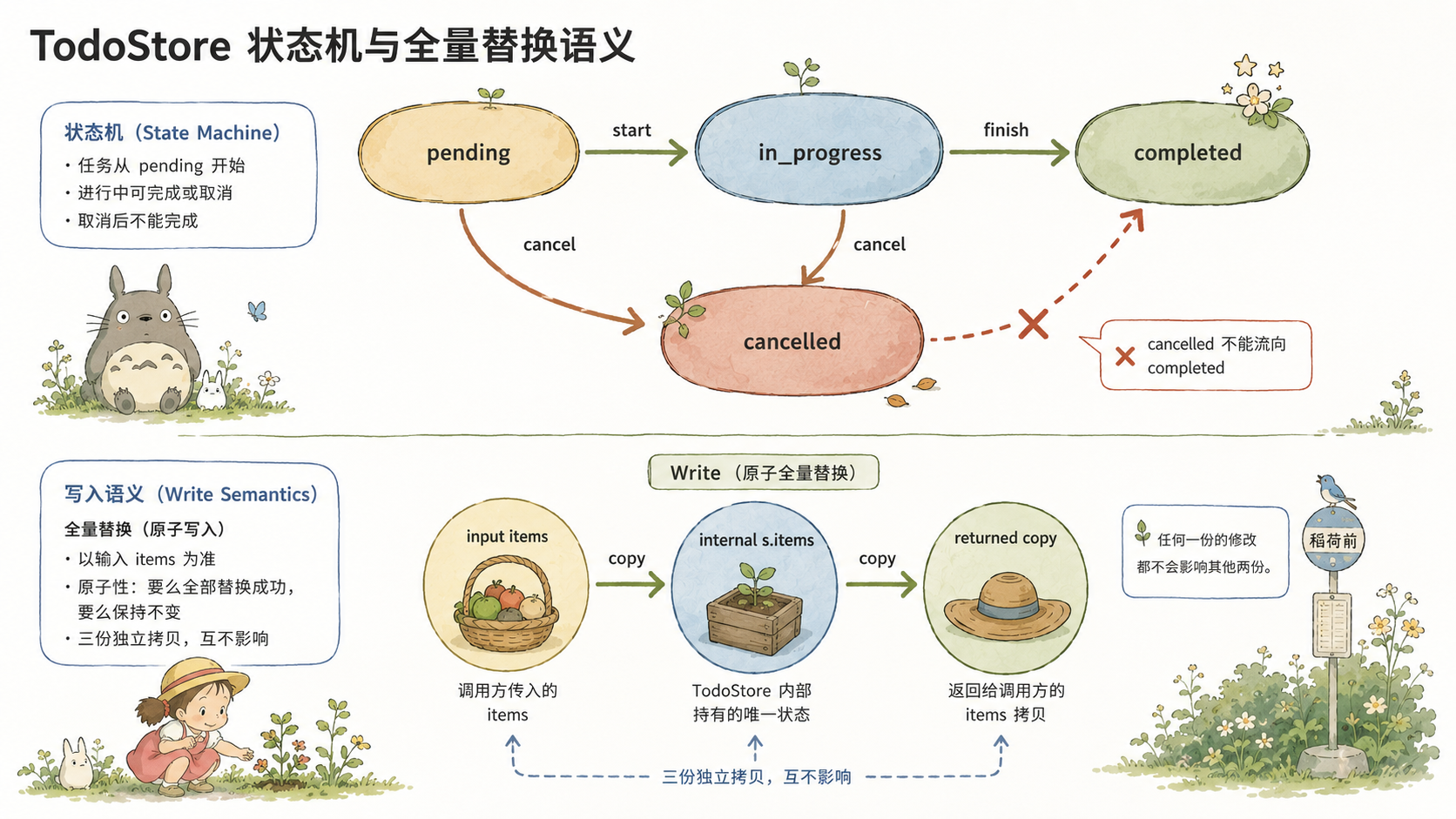
State-transition constraints were deliberately kept out of TodoStore:
// TodoStatus transition constraints are enforced by the todo_write tool (the tools package);
// TodoStore itself performs no validation.
TodoStore is a judgment-free storage layer; business constraints are expressed at the tool layer. This separation is intentional — TodoStore can be written to directly with arbitrary states in test code, without needing to bypass validation logic; and the tool layer's validation logic can evolve independently, without touching the storage layer.
todo_write: the engineering story behind anti-cheat
The anti-cheat validation in the todo_write tool wasn't derived from a design document — it came from a concrete bug.
In one continuous conversation, the LLM batch-completed 9 of 11 tasks in a single call (jumping from 2/11 to 11/11), with no corresponding file creation or bash execution. This was "hallucinated execution" — the LLM skipped the actual work and simply fabricated progress.
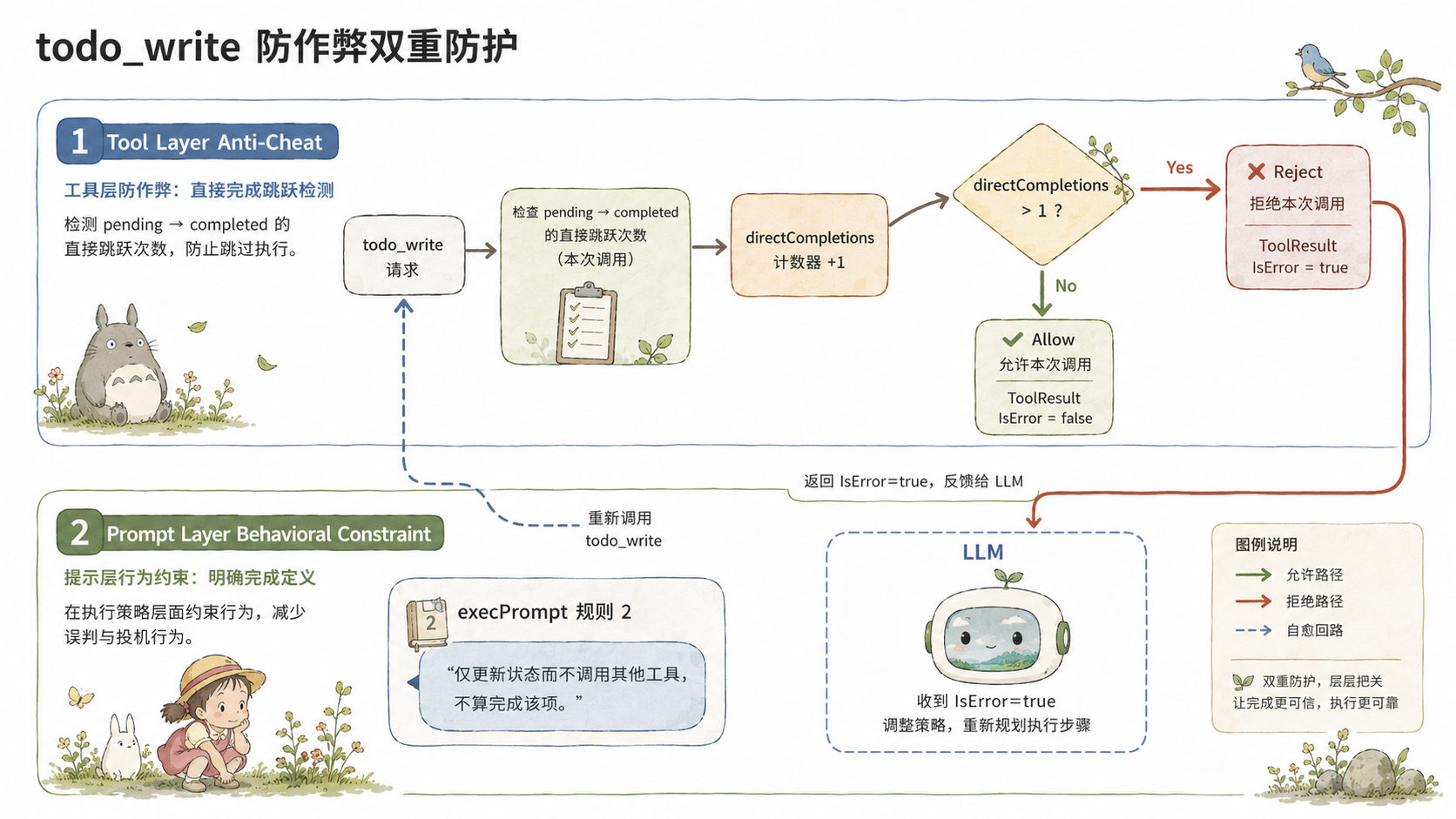
The fix: in a single todo_write call, allow at most 1 task to jump directly from a non-in_progress state to completed:
// internal/tools/todo_write.go — Execute()
prev := t.store.Read()
prevStatus := make(map[string]planning.TodoStatus, len(prev))
for _, item := range prev {
    prevStatus[item.ID] = item.Status
}

var directCompletions int
for _, item := range input.Todos {
    if item.Status != planning.TodoCompleted {
        continue
    }
    prior, exists := prevStatus[item.ID]
    if !exists || prior == planning.TodoPending {
        directCompletions++  // pending → completed, counted
        continue
    }
    if prior == planning.TodoCancelled {
        return "", fmt.Errorf("task %q was cancelled and cannot be marked completed directly...", item.ID)
    }
    // in_progress → completed: legal, not counted
}
if directCompletions > 1 {
    return "", fmt.Errorf(
        "not allowed to mark %d tasks as completed directly (without passing through in_progress) in a single call...",
        directCompletions)
}
Why is the threshold 1 rather than 0?
A threshold of 0 would cause false positives during continuation runs: the Agent completes a genuine piece of work in one continuation (calling bash or write_file), then marks the corresponding todo as completed directly, without going through the in_progress intermediate step — this is legitimate behavior; the Agent skipped the intermediate status-marking step, but the work itself is real. A threshold of 0 would cause the Agent to repeatedly receive rejection errors and get stuck in a retry loop.
A threshold of 1 preserves protection against the original bug pattern (mass batch completion) while still allowing the normal case of completing a single item directly.
When validation fails, todo_write returns an error, which the engine wraps as ToolResult{IsError: true} and injects into the context. The LLM sees the tool-call failure message and is forced to reorganize its arguments. The loop doesn't terminate — the Agent corrects itself. This is the standard pattern behind harness9's "self-healing" design.
The intent behind the execution prompt
Once the user approves the plan, the TUI doesn't simply send "start executing" — it sends a carefully crafted specification:
// cmd/harness9/tui_update.go
const execPrompt = "Work through the todo list item by item. Rules:\n" +
    "1. Before starting each item, use todo_write to set its status to in_progress\n" +
    "2. Use tools to do the actual work for that item — create files, write code, run commands, etc.; " +
    "merely updating the todo_write status without calling any other tool does not count as completing the item\n" +
    "3. Once you've confirmed real output, use todo_write to set its status to completed\n" +
    "4. Do not output progress-summary text; move on to the next item immediately\n" +
    "Once everything is done, report the overall result in one sentence."
Rule 2 is the key one: "merely updating the status without calling any other tool does not count as completing the item." This is a prompt-layer constraint against hallucinated execution, forming a second line of defense alongside the tool layer's batch-completion detection. One layer is a hard rejection; the other is behavioral guidance — both guard against the same failure mode, but through different mechanisms.
Continuation runs use a leaner execContinuePrompt:
const execContinuePrompt = "Continue processing the next pending or in_progress item in the todo list. " +
    "First use todo_write to mark it in_progress, then use tools to do the actual work (write files, run commands, etc.), " +
    "and once you've confirmed the output, mark it completed before moving to the next item. " +
    "Do not just update the status without doing real work, and do not output a progress summary."
Continuation doesn't need to repeat the full rule set — the LLM's context already contains the history of execPrompt and already knows the basic framework. The leaner version only needs to say "continue to the next item," reducing wasted token consumption.
Stagnation detection: counting done, not pending
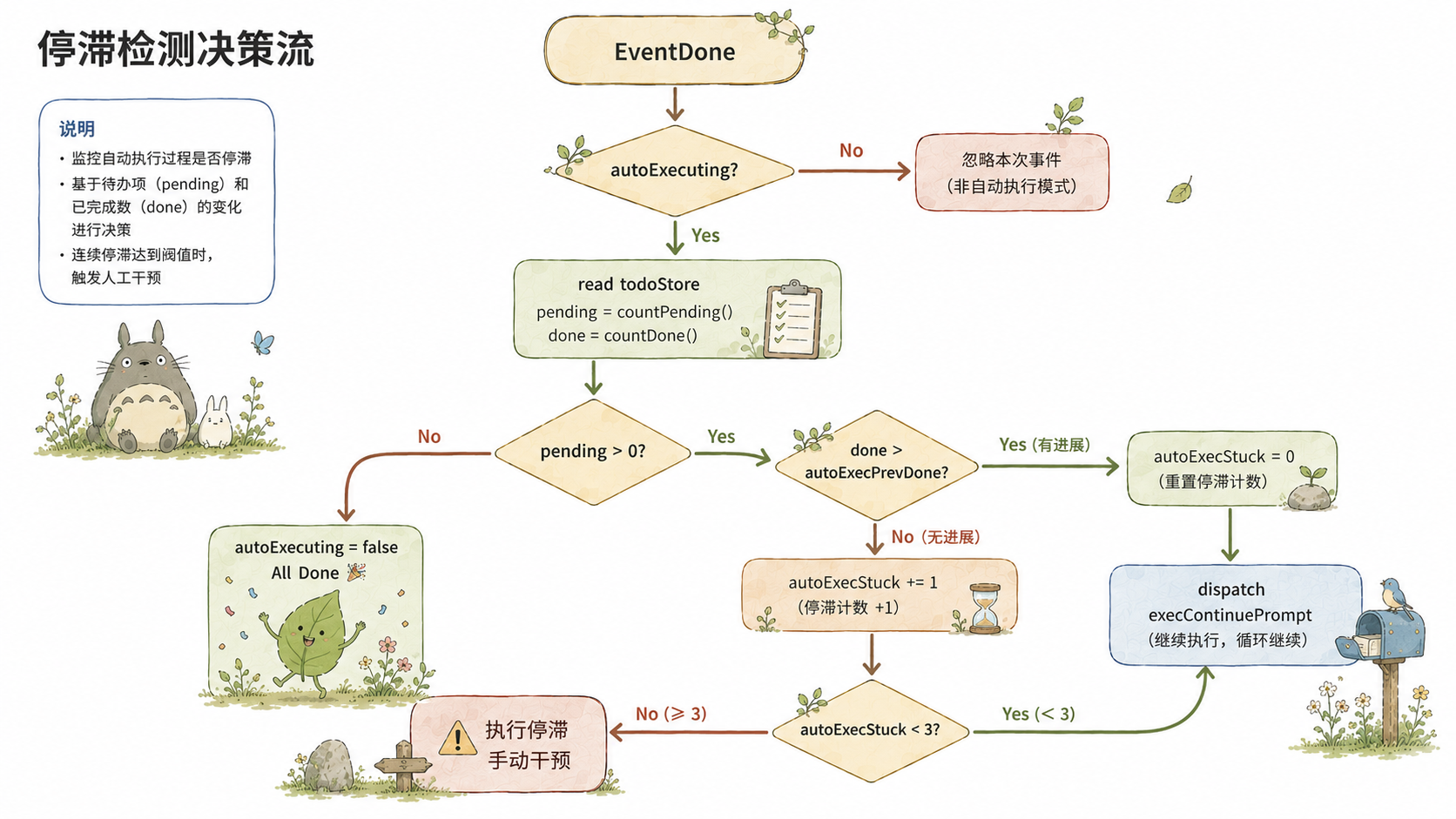
In auto-execution (autoExecuting) mode, every EventDone triggers the following decision:
// cmd/harness9/tui_update.go — EventDone handler
if m.autoExecuting && m.todoStore != nil {
    items := m.todoStore.Read()
    var pending, done int
    for _, item := range items {
        switch item.Status {
        case planning.TodoPending, planning.TodoInProgress:
            pending++
        case planning.TodoCompleted:
            done++
        }
    }
    if pending > 0 {
        if done > m.autoExecPrevDone {
            m.autoExecStuck = 0  // progress made, reset
        } else {
            m.autoExecStuck++   // no progress, count it
        }
        if m.autoExecStuck < 3 {
            m.autoExecPrevDone = done
            return m.dispatch(execContinuePrompt)
        }
        m.autoExecuting = false
        m.lines = append(m.lines, dimStyle.Render("  ⚠ Execution stalled, please describe the next step manually"))
    } else {
        m.autoExecuting = false  // everything done
    }
}
Stagnation detection is judged against done (number completed) rather than pending (number remaining). This choice is worth unpacking.
Changes in pending can come from two sources: a task actually being completed (pending → in_progress → completed) or a task simply being marked in progress (pending → in_progress). If progress were judged by a decrease in pending, the LLM could keep progress detection passing indefinitely just by continuously flipping tasks to in_progress without ever really finishing them — another form of hallucinated execution.
Only the completed state represents genuine work output. If the done count doesn't increase after a round of EventDone, it means the LLM ran a full round of reasoning without advancing any task to completion. After 3 consecutive rounds like this, stagnation detection kicks in.
The threshold of 3 is an empirical value: it gives the LLM some buffer for complex tasks that need multiple rounds of exploration to complete, while still preventing indefinite spinning.
dispatch() itself has built-in concurrency protection:
func (m tuiModel) dispatch(prompt string) (tuiModel, tea.Cmd) {
    if m.running {
        return m, nil  // reasoning already in progress, silently ignore
    }
    // ...
}
During autoExecuting continuation, dispatch is called by the EventDone handler within the single-threaded Elm Update loop, so there's no concurrency issue there. The running check is an extra safety net, guarding against other code paths accidentally triggering dual concurrent reasoning.
FilePlanWriter: more than just writing a file
Every time the todo_write tool successfully writes, if a FilePlanWriter has been injected, the task list is persisted as a Markdown file:
// internal/hooks/plan_writer.go
func NewFilePlanWriter(workDir, homeDir, sessionID string) (*FilePlanWriter, error) {
    timestamp := time.Now().Unix()
    slug := sessionID[:8]
    filename := fmt.Sprintf("%d-%s.md", timestamp, slug)

    var base string
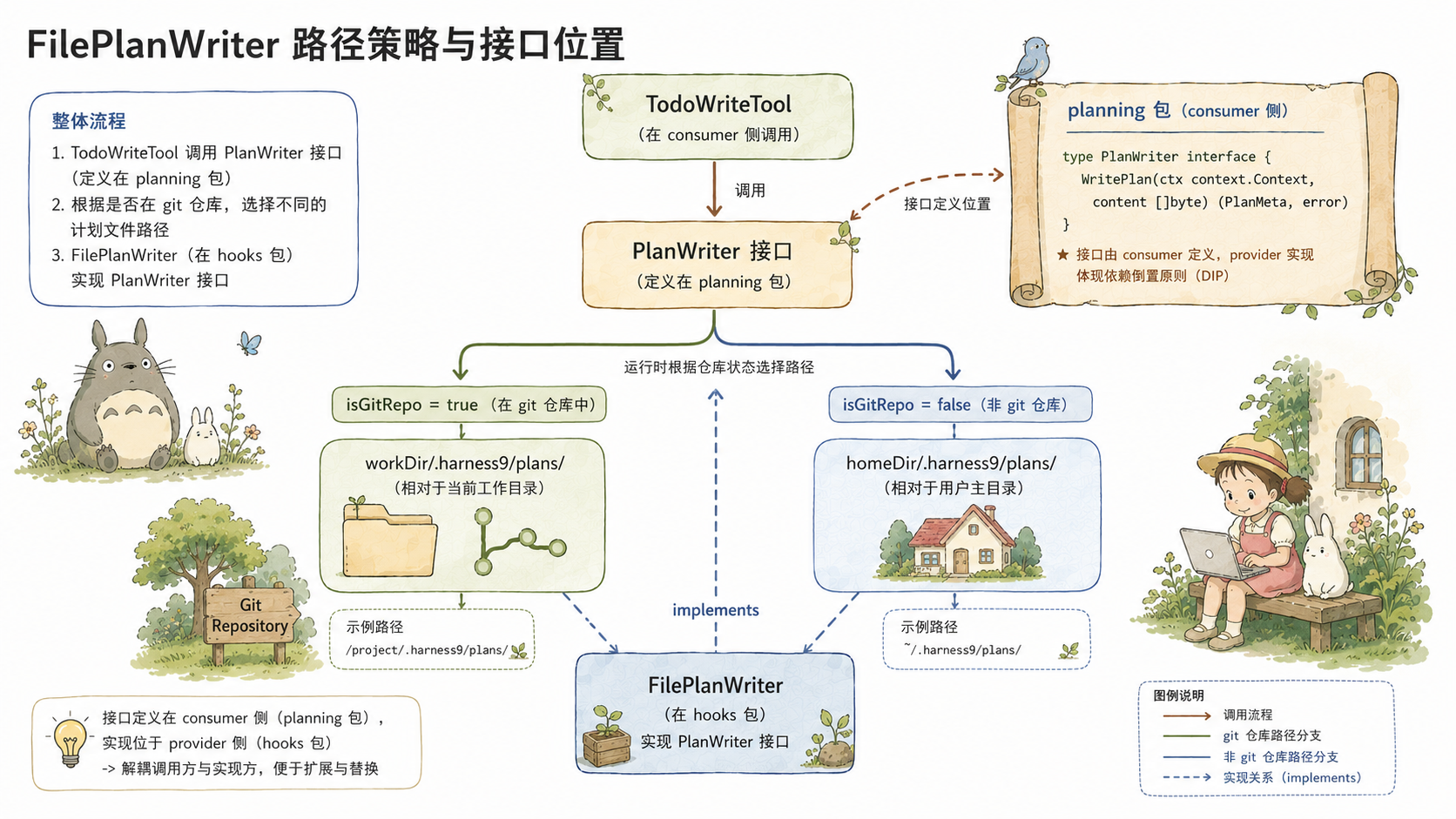
    if isGitRepo(workDir) {
        base = filepath.Join(workDir, ".harness9", "plans")
    } else {
        base = filepath.Join(homeDir, ".harness9", "plans")
    }
    // ...
}
The path strategy has a simple but interesting branch: isGitRepo(workDir) checks whether the working directory contains a .git folder.
For git repos, plans are written to workDir/.harness9/plans/ — this path lives under the project directory, so it can be tracked in version control or excluded via .gitignore. Keeping planning artifacts next to the project keeps task state contextually tied to code changes.
For non-git repos, plans are written to homeDir/.harness9/plans/ — there's no notion of a project directory, so they're stored centrally under a personal data area in the home directory, without polluting the current working directory.
This decision is made at construction time, not on every write. isGitRepo is called once, the path is fixed, and the Write method overwrites the same file each time rather than recomputing the path.
The PlanWriter interface is defined in the planning package, not the hooks package:
// internal/planning/plan_writer.go
type PlanWriter interface {
    Write(todos []TodoItem) error
}
This follows harness9's consistent principle for interface placement: interfaces are defined on the consumer side, not the implementer side. TodoWriteTool uses PlanWriter, so the interface is defined in the planning package. FilePlanWriter implements this interface, but the interface isn't declared in the hooks package. The practical effect of this choice is that it cuts off the tools package's dependency on the hooks package — if the interface lived in the hooks package, tools would have to import hooks, and hooks would in turn import tools, producing an immediate import cycle.
State continuity across runLoop invocations
The contents of TodoStore are persisted to SQLite alongside the Session, automatically synced each time runLoop starts and ends:
// agent_loop.go — runLoop
// On start: restore from Session
if sess != nil && todoStore != nil {
    if todos, err := sess.GetTodos(ctx); err == nil {
        todoStore.Write(todos)
    }
}

// On end: defer guarantees execution on every exit path
defer func() {
    if sess != nil && todoStore != nil {
        if err := sess.SaveTodos(ctx, todoStore.Read()); err != nil {
            log.Print(...)
        }
    }
}()
In autoExecuting mode, each continuation is a separate call to runLoop. Every runLoop invocation restores TodoStore from the DB on start and writes it back on exit — this is what makes the todo_write anti-cheat validation correct: pending tasks are saved to the DB after the previous run, loaded back into memory on the next run, and the prevStatus snapshot accurately reflects the historical state of each task. Without this persistence, the cross-runLoop state comparison would break down, and batch-completion detection would become a dud.
The defer is the key detail: whether runLoop exits via natural termination (the LLM stops calling tools), MaxTurns being exceeded, or context cancellation, SaveTodos always runs.
During context compaction, active tasks are injected alongside the summary:
// internal/memory/summarization.go — Compact()
if c.TodoInjector != nil {
    if todoText := c.TodoInjector.FormatForInjection(); todoText != "" {
        summaryContent += "\n\n## Active Tasks\n" + todoText
    }
}
The compacted summary message ends with something like:
## Active Tasks
[ ] Implement handler/user.go
[>] Configure database connection
[ ] Add route registration
Even if the conversation history has been compacted beyond recognition, unfinished tasks never disappear from the LLM's view.
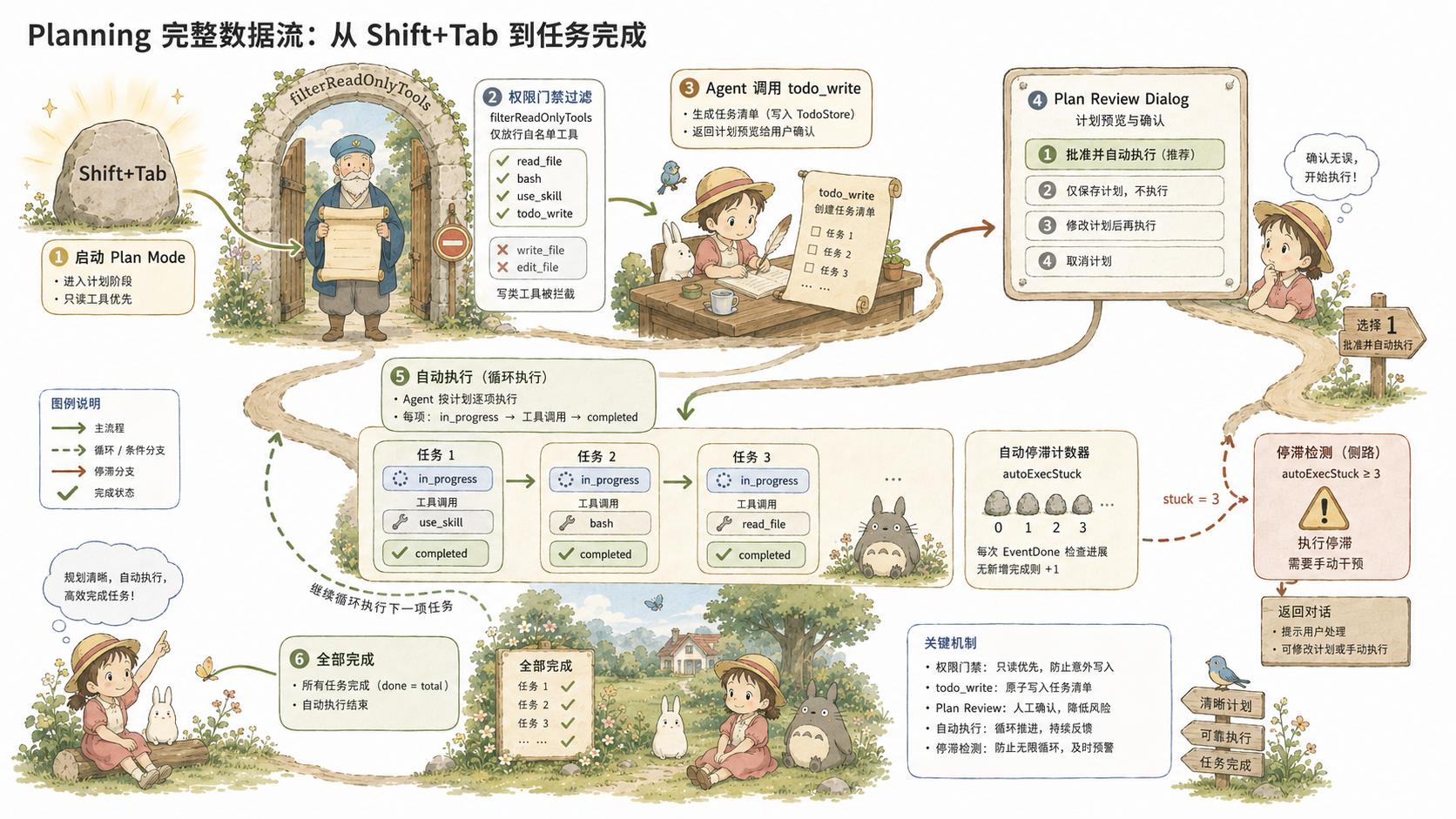
Design details of the todo_write tool
todo_write is the sole task-management interface the Planning module exposes to the LLM. It's worth a closer look, because a few interesting engineering decisions are hiding in the details.
Dual mode: one tool, two calling semantics
todo_write's parameter definition has only one field: todos. But this field carries two entirely different semantics:
// internal/tools/todo_write.go
type todoWriteArgs struct {
    Todos []planning.TodoItem `json:"todos"`
}

// Execute: distinguishes read/write mode via len(input.Todos) > 0
if len(input.Todos) > 0 {
    // write: full replacement + anti-cheat validation
    current = t.store.Write(input.Todos)
} else {
    // read: return the current snapshot without mutating state
    current = t.store.Read()
}
Omitting the todos field or passing an empty array turns the tool into a read-only query; passing a non-empty array triggers a full replacement. Both modes share the same registered tool name — the LLM doesn't need to distinguish between a "read todos" tool and a "write todos" tool. One tool, behavior controlled by arguments.
This isn't just for the sake of tidiness. The length of the tool list consumes the LLM's context window and affects the model's accuracy in selecting the right tool. With an already sizable number of tools, merging read and write into a single tool is a pragmatic way to reduce cognitive load.
A state machine inside the schema
todo_write's JSON Schema defines the status field as a finite enum:
"status": map[string]interface{}{
    "type": "string",
    "enum": []string{"pending", "in_progress", "completed", "cancelled"},
},
Four legal values; anything else never even reaches the API. This pushes the state machine's set of legal values down into the schema layer — there's no need for enum validation inside Execute, because the model is already constrained to a legal state range at the moment it calls the tool.
This is the same idea as Plan Mode's tool filtering, just applied at a different granularity: Plan Mode constrains at the level of the tool list (certain tools are entirely invisible), while the schema constrains at the level of a parameter (a given field's legal values are limited). Both operate at the "tool definition" layer, rather than relying on prompt wording.
Normalizing nil to []
There's a subtle detail in Execute's return path:
if current == nil {
    current = []planning.TodoItem{}
}
b, err := json.Marshal(current)
json.Marshal(nil) produces "null"; json.Marshal([]planning.TodoItem{}) produces "[]". The two are semantically equivalent to a Go program, but very different to an LLM — null is an unstructured value, while [] is an explicit empty list. The LLM needs to know "there are currently no tasks," not "the task-list field doesn't exist." This one-character difference determines whether the LLM can correctly infer its next action.
WithPlanWriter: optional injection, not a mandatory dependency
TodoWriteTool injects a PlanWriter via the Option pattern:
// internal/tools/todo_write.go
type TodoWriteOption func(*TodoWriteTool)

func WithPlanWriter(pw planning.PlanWriter) TodoWriteOption {
    return func(t *TodoWriteTool) { t.planWriter = pw }
}
The planWriter field defaults to nil; when it's not injected, persistence is simply skipped, and the tool itself remains fully usable. This means TodoWriteTool can be instantiated directly in unit tests, without needing to construct a real FilePlanWriter — the tests only need to verify task-list state changes, not care about the filesystem.
The Option pattern is the standard convention for constructors throughout harness9 (WithMaxTurns, WithToolTimeout, and others all follow it), and WithPlanWriter follows the same design language, so new readers don't need to learn anything extra to understand the injection semantics.
The handling of persistence failure is also worth noting:
if t.planWriter != nil {
    if err := t.planWriter.Write(current); err != nil {
        log.Print(logfmt.FormatMsg("todo_write", fmt.Sprintf("failed to write plan file: %v", err)))
    }
}
A failed file write is only logged; it's not propagated back to the LLM as an error. This is a fail-open strategy — persistence is an auxiliary feature, not part of the core task-management path. If FilePlanWriter fails due to a full disk or a permissions issue, the task list has already been written to TodoStore (in memory), and the Agent can keep running; only this round's planning artifact fails to land on disk. Conversely, if planWriter.Write's failure were propagated to the LLM, it would push the Agent into an error-recovery loop, paying an unnecessary cost for the failure of a non-core feature.
Closing thoughts
The real value of the Planning module isn't "adding a planning phase to the Agent" — it's moving several key behavioral constraint points for the Agent from the soft layer (the prompt) to the hard layer (the code). Every such move needs a justification: why can't this be handled by the prompt alone? The answer is usually: prompts can be forgotten, compacted away, or bypassed — code cannot.
Something to think about: todo_write's anti-cheat threshold is 1. What scenarios would change if it were 2? What about 0?